

Last Updated on August 1, 2026 by Admin
A single expired certificate of insurance can stop a concrete pour, delay a certificate of occupancy, or leave a general contractor personally absorbing a claim that should have sat with a subcontractor’s carrier. Yet most construction firms still track certificates of insurance in spreadsheets, shared drives, and email folders — a system that works fine at twenty subcontractors and collapses somewhere past fifty.
ConstructionCareerHub App is LIVE — built ONLY for construction careers. Don’t apply with a weak resume.
Get ATS-ready Resume Lab + Interview Copilot + Campus Placement Prep (resume screening, skill gaps, interview readiness) — in minutes & Other advanced features.
Explore Smarter Construction Career Tools →Quick check. Big impact. Start now.
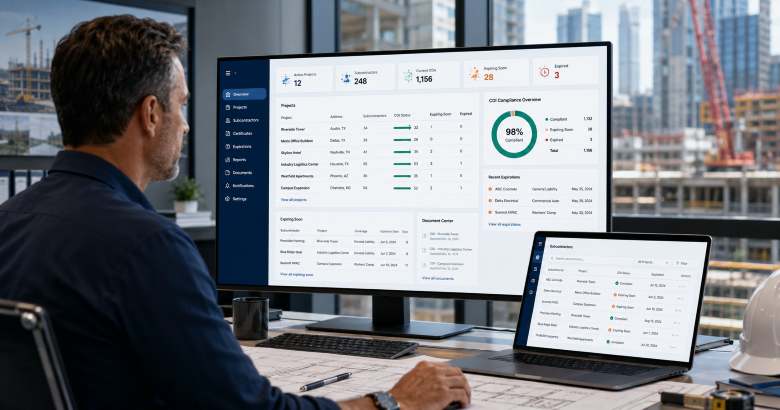
Construction COI tracking software solves that specific problem. It collects certificates from subcontractors and vendors, reads the coverage details, checks them against your contract requirements, chases renewals automatically, and gives you an audit-ready record when a claim, an insurer audit, or a lawsuit arrives. This guide compares the ten platforms that matter most to general contractors, developers, and construction risk teams in 2026 — with honest notes on what each one does well and where it falls short.
Table of Contents
Quick Answer: The Best Construction COI Tracking Software in 2026
The best construction COI tracking software in 2026 is Billy for general contractors who want construction-native workflows and Procore integration, myCOI/illumend for teams that want AI-led compliance decisions backed by insurance specialists, Jones for firms managing both construction and commercial real estate portfolios, TrustLayer for tech-forward teams wanting API-first verification, and Certificial for organisations that need live policy monitoring rather than static PDF tracking. Most platforms price per vendor per year, typically in the range of a few dollars for self-service tiers up to roughly thirty dollars per vendor for fully managed review, though nearly all enterprise pricing is quote-based.
What Is Construction COI Tracking Software?
Construction COI tracking software is a certificate of insurance management platform that automates the collection, review, verification, and renewal monitoring of insurance documents submitted by subcontractors, suppliers, and vendors on construction projects.
The certificate itself is usually an ACORD 25 Certificate of Liability Insurance — a standardised one-page summary showing the insured party, the carriers, policy numbers, effective and expiration dates, and coverage limits for general liability, auto liability, workers’ compensation, and umbrella policies. Critically, the ACORD 25 is a snapshot, not a contract. It does not confer coverage, and it does not prove that additional insured status, waiver of subrogation, or primary and non-contributory language has actually been endorsed onto the underlying policy. That gap between what a certificate appears to say and what the policy actually does is where most construction insurance exposure lives.
Good COI tracking software closes that gap in four ways:
- Automated collection. Requests go out to subcontractors on a schedule, with reminders, without anyone on your team writing an email.
- Data extraction and review. OCR and AI read the certificate and any attached endorsements, pulling limits, dates, carriers, and endorsement language into structured fields.
- Requirement matching. The extracted data is compared against the insurance requirements written into your subcontract — not a generic template — and deficiencies are flagged with specific reasons.
- Expiry and lapse monitoring. Renewals are tracked automatically, and the better platforms detect mid-term cancellations rather than waiting for the expiration date to pass.
If you are new to the wider category of construction technology, our overview of construction management software in 2026 explains where compliance tools sit relative to project management, scheduling, and financial platforms.
Why COI Tracking Matters More in 2026
Three forces have pushed insurance compliance from an administrative chore to a board-level risk item.
Contractual liability keeps flowing upstream. Owners and lenders now routinely require general contractors to evidence that every tier of subcontractor carries specified coverage, with the GC and owner named as additional insureds. When a sub’s policy lapses and an incident occurs, the claim lands on the GC’s own general liability tower — eroding limits, driving up renewal premiums, and in severe cases triggering a coverage dispute. Our guide to insurance and liability in construction covers how these risk-transfer mechanisms are supposed to work, and our explainer on subcontractor default insurance covers what happens when transfer fails.
Regulatory exposure is not limited to insurance. Under OSHA’s Multi-Employer Citation Policy (CPL 02-00-124), a general contractor can be cited as a “controlling employer” for hazards created by a subcontractor — even where the GC’s own employees were never exposed. Documented, systematic vetting of trade partners is one of the clearest ways to demonstrate the reasonable care that this doctrine requires. Compliance records and insurance records increasingly live in the same system for precisely this reason.
Volume has outgrown manual process. A mid-size commercial GC running six concurrent projects may deal with 200 or more active subcontractors, each with three to five separate policies renewing on independent dates. That is 600 to 1,000 documents per year, before change orders, tier-two subs, equipment lessors, and consultants. No spreadsheet survives that at acceptable accuracy. For context on how compliance interlocks with the rest of the trade-partner lifecycle, see our full guide to subcontractor management in construction.
Building a career in construction risk, contracts, or procurement? The compliance skills described in this article — insurance review, prequalification, document control, vendor risk scoring — are exactly what employers screen for. Explore role-matched career tools, resume analysis, and interview preparation built only for construction at ConstructionCareerHub.com.
Comparison Table: 10 Best Construction COI Tracking Software Platforms (2026)
| Platform | Best For | Standout Capability | Construction Integrations | Pricing Model |
|---|---|---|---|---|
| Billy | General contractors and developers | Construction-native workflow with self-service or managed review | Procore side panel, Autodesk, multiple ERPs | Per vendor per year; self-service and managed tiers |
| myCOI / illumend | Teams wanting AI-led compliance decisions | AI engine trained on long-running compliance expertise | Procore Marketplace and common property systems | Quote-based |
| Jones | Mixed construction and CRE portfolios | Deep bi-directional Procore and MRI integration | Procore, MRI, property platforms | Quote-based, managed service |
| TrustLayer | Tech-forward and API-first teams | Large verified company network, no-login vendor upload | API-led; broad third-party connections | Tiered; free starter tier for small vendor counts |
| Certificial | Risk teams needing live policy data | Real-time monitoring via agency management systems | Broker and carrier network rather than PM tools | Quote-based |
| bcs | Teams wanting AI plus human analysts | AI review agent backed by US-based analyst team | Procore, Viewpoint Vista, Sage 300, CMiC, Yardi, MRI | Self-service and full-service options |
| CertFocus by Vertikal RMS | Enterprise and public-sector programmes | High-volume automated certificate processing | Enterprise ERP connections | Quote-based |
| SmartCompliance | Broker-led and outsourced models | Full-service and self-service COI tracking | Procore Marketplace presence | Quote-based; trial-led evaluation |
| Evident | Multinational and enterprise vendor networks | Verification across many coverage lines and countries | TPRM and supplier management platforms | Quote-based, enterprise |
| Procore (Qualifications) | GCs standardising inside one platform | Compliance data attached to the project record itself | Native to Procore | Add-on module to Procore licence |
The 10 Best Construction COI Tracking Software Platforms in 2026
1. Billy — Best Overall for Construction General Contractors
Best for: Commercial and residential general contractors, home builders, and developers who want a COI platform that speaks construction rather than generic vendor management.
Key features: Automated certificate collection with no vendor login required; self-service or fully managed review handled by insurance specialists; a Procore side panel that surfaces compliance status without leaving the project; integrations across construction ERPs and project management tools; handling of surety bonds, W-9s, and business licences alongside COIs; and built-in subcontractor prequalification so insurance sits within a broader vetting workflow.
Why it is useful for general contractors: Billy is one of the few platforms designed around the way a GC actually works — compliance tied to project timelines, pay applications, and subcontract commitments rather than to an abstract vendor list. The ability to start on a self-service tier and move to managed review without changing vendors is genuinely useful for firms whose volume is growing. It also gives subcontractors free tools, which lowers the friction that normally makes trade partners resent compliance portals.
Pros: Purpose-built for construction; strong Procore workflow; flexible service model; low submission burden on subcontractors; transparent per-vendor pricing tiers.
Limitations to consider: Billy works from certificates submitted by subcontractors rather than connecting directly to carrier or agency systems, so it does not deliver the live policy monitoring that a network-based platform provides. Firms whose primary concern is mid-term cancellation detection should evaluate it against Certificial.
Pricing note: Billy publishes indicative per-vendor annual ranges, with self-service tiers materially cheaper than fully managed review. Exact pricing depends on vendor count and service level, so request a quote.
Ideal user: Mid-size to large GCs and developers already running Procore or Autodesk.
Official website: billyforinsurance.com
2. myCOI / illumend — Best for AI-Led Insurance Compliance Decisions
Best for: Risk and compliance teams that want the platform to make the compliance call rather than surface data for a human to interpret.
Key features: An AI compliance engine that reads certificates and endorsements and decides whether the language satisfies your contract requirements; automated outreach to partners with specific requirement details; guided remediation for vendors who submit non-compliant documents; automated renewal cycles; and checks on additional insured status, waiver of subrogation, primary and non-contributory wording, and per-project aggregates.
Why it is useful for general contractors: The hardest part of COI review is not reading the expiration date — it is determining whether a specific endorsement form actually delivers the additional insured protection your subcontract demands. myCOI, now operating its AI-native product under the illumend brand, is explicitly built around that judgement layer, drawing on more than a decade and a half of certificate compliance operations.
Pros: Deep insurance domain expertise; endorsement-level analysis rather than surface data capture; established track record across construction and property portfolios; strong outsourced service history.
Limitations to consider: The transition from the legacy myCOI product to the AI-first illumend platform is relatively recent, so ask for a live demonstration using one of your own complex certificates. Some users historically reported inconsistent review turnaround during renewal peaks. Vendors submit through a portal, which adds friction compared with no-login models.
Pricing note: Quote-based. Expect a sales conversation before pricing is disclosed.
Ideal user: Enterprise GCs, property owners, and risk managers handling complex, endorsement-heavy insurance requirements.
Official website: illumend.ai
3. Jones — Best for Combined Construction and Real Estate Portfolios
Best for: Developers, owner-operators, and construction firms whose insurance compliance spans both active projects and stabilised property assets.
Key features: Automated COI verification combining AI extraction with human validation; bi-directional integrations with Procore and MRI that keep compliance status synchronised inside your system of record; a vendor network carrying verified insurance profiles and predicted compliance; exception handling workflows; and audit-ready documentation across thousands of vendors.
Why it is useful for general contractors: Jones has invested heavily in the depth of its Procore integration, which matters when your project managers should never have to open a second application to know whether a sub can be released to work. The network effect also helps — if a subcontractor is already verified in the Jones network, onboarding is faster.
Pros: Among the most embedded Procore integrations available; strong dual coverage of construction and commercial real estate; combines automation with expert review; fast processing turnaround.
Limitations to consider: Jones is a managed service rather than a self-service tool, which suits larger programmes but may exceed the needs and budget of a small GC. Vendors submit through a portal. COI tracking is its core strength; full prequalification covering safety records and financial capacity is comparatively lighter.
Pricing note: Quote-based, scaled to vendor volume.
Ideal user: Enterprise developers and GCs with mixed construction and property portfolios.
Official website: getjones.com
4. TrustLayer — Best for API-First and Tech-Forward Teams
Best for: Risk, procurement, and operations teams that want to embed insurance verification into their own systems rather than adopt another standalone interface.
Key features: AI-powered document extraction; a large network of companies whose compliance records may already exist before you onboard them; no-login document submission for vendors on paid tiers; support for documents beyond certificates including W-9s, attestations, and contracts; automated follow-up sequences; and audit-ready record keeping.
Why it is useful for general contractors: TrustLayer’s network breadth means a meaningful share of your existing trade partners may already be in the system, which shortens onboarding. Its broker relationships also make it a natural fit where your insurance programme is broker-managed and you want the broker involved in compliance oversight.
Pros: Free starter tier makes evaluation genuinely low-risk for small vendor counts; large existing company network; modern interface; document scope extends well beyond COIs.
Limitations to consider: Human expert review is a paid add-on rather than a default, meaning the base product tells you what the certificate says but not necessarily whether it satisfies your subcontract. It is a multi-industry platform, so construction-specific workflows are shallower than Billy’s or Jones’s.
Pricing note: Tiered pricing with a free option for smaller vendor counts; paid tiers scale with volume and service level.
Ideal user: Mid-market to enterprise firms with in-house technical capability and broker-led insurance programmes.
Official website: trustlayer.io
5. Certificial — Best for Real-Time Policy Monitoring
Best for: Risk managers whose principal fear is not an expired certificate but an active certificate covering a policy that was quietly cancelled mid-term.
Key features: A network model connecting directly to insurance agency management systems for live policy data; detection of mid-term cancellations, coverage reductions, and schedule-level changes; broker-submitted documents that remove vendor upload steps entirely; and continuous rather than point-in-time compliance status.
Why it is useful for general contractors: Every document-based COI platform shares one structural weakness — a certificate is accurate only at the instant it is issued. If a subcontractor stops paying premiums in month four of a twelve-month policy, a document-based system will happily show green until the expiration date arrives. Certificial’s connection to agency systems is designed specifically to close that window.
Pros: The strongest answer available to the mid-term cancellation problem; removes vendor login friction; reduces certificate fraud risk because data originates with the agent rather than the subcontractor.
Limitations to consider: The model depends on broker and carrier participation, so subcontractors placed through small regional agencies may take longer to onboard. It does not integrate natively with Procore or Autodesk, meaning project managers must check compliance in a separate system — a real workflow cost for construction teams.
Pricing note: Quote-based.
Ideal user: Enterprise risk and third-party risk management teams where coverage continuity outweighs project-tool integration.
Official website: certificial.com
6. bcs (Business Credentialing Services) — Best for AI Plus Expert Analyst Review
Best for: Firms that want automation but are not willing to hand final compliance judgement to software alone.
Key features: An AI review agent that reads both certificates and endorsement forms; a substantial vendor database carrying pre-verified insurance profiles; US-based analysts who collect, correct, and chase documents; colour-coded compliance dashboards; and integrations spanning Procore, MRI Software, Yardi, Viewpoint Vista, Sage 300, and CMiC.
Why it is useful for general contractors: The integration list is the standout. A GC running Viewpoint Vista or CMiC for accounting alongside Procore for project management gets compliance data flowing into both, which is rarer than it should be. The hybrid AI-plus-analyst model also gives a defensible answer when an insurer or attorney asks who reviewed a particular certificate and on what basis.
Pros: Broad construction ERP integration coverage; no-login vendor submission; established operating history; combines speed with human accountability.
Limitations to consider: Full-service pricing sits above self-service alternatives. Like most multi-industry platforms, its construction-specific project workflows are less tailored than construction-only tools.
Pricing note: Both self-service software and full-service managed options are offered; pricing is quote-based.
Ideal user: Mid-size and large GCs running an ERP alongside a project management platform.
Official website: getbcs.com
7. CertFocus by Vertikal RMS — Best for Enterprise and Public-Sector Programmes
Best for: Large contractors, public agencies, and owner organisations processing certificates at very high volume.
Key features: AI-assisted extraction and verification running simultaneously to compress processing time; enterprise ERP connections; configurable compliance rules by project, contract type, or business unit; and long-established programme administration for complex organisational structures.
Why it is useful for general contractors: Public works and large institutional programmes generate compliance requirements that vary by funding source, contract vehicle, and jurisdiction. CertFocus is built for that kind of configurability rather than for a single standard rule set, which is where lighter tools tend to break down.
Pros: Fast processing at scale; mature enterprise and public-sector deployment experience; deep rule configurability.
Limitations to consider: Enterprise orientation means implementation is a project, not a signup. Smaller GCs will find the configuration overhead disproportionate to their needs.
Pricing note: Quote-based enterprise pricing.
Ideal user: ENR-scale contractors, public agencies, and institutional owners.
Official website: vertikalrms.com
8. SmartCompliance — Best for Broker-Led and Outsourced Compliance
Best for: Organisations whose insurance broker or agency runs compliance oversight on their behalf, and firms wanting to trial a platform before committing.
Key features: Certificate collection and tracking with automated renewal requests; OCR-supported compliance review; both full-service and self-service delivery models; in-house control over contract and certificate holder data; and presence in the Procore Marketplace.
Why it is useful for general contractors: Many construction firms already delegate substantial risk administration to their broker. SmartCompliance is structured to work inside that relationship rather than around it, and its self-service option keeps certificate-holder data under your control if you prefer not to outsource entirely.
Pros: Flexible service models; broad industry coverage; established track record on high-volume certificate programmes; evaluation-friendly onboarding.
Limitations to consider: OCR accuracy on non-standard or handwritten documents can be inconsistent, and setup complexity increases as custom requirement configurations grow. It is not the strongest fit for very large multi-location programmes with heavy integration demands.
Pricing note: Quote-based, with trial-led evaluation available.
Ideal user: Small to mid-size contractors and broker-managed compliance programmes.
Official website: smartcompliance.co
9. Evident — Best for Global and Multinational Vendor Networks
Best for: Multinational contractors, EPC firms, and enterprises where insurance verification is one component of a wider third-party risk management programme.
Key features: Verification across a wide range of insurance lines in more than a hundred countries and many languages; a very large network of verified vendors and suppliers; credential and identity verification alongside insurance; automated outreach and document collection; real-time alerts on cancellations, lapses, and exceptions; and integration with existing TPRM and supplier management platforms.
Why it is useful for general contractors: If your supply chain crosses borders — an EPC contractor procuring across the Gulf, South Asia, and Europe, for example — most COI platforms simply do not handle non-US certificate formats or foreign carriers. Evident’s international coverage is its clearest differentiator, and it extends into background checks and business registration verification.
Pros: Genuine multinational capability; verification scope well beyond certificates; large verified network; strong automation of vendor chasing.
Limitations to consider: For a purely domestic construction or property portfolio, Evident is more infrastructure than most firms need, and pricing reflects enterprise positioning. It is a TPRM platform first and a construction tool second.
Pricing note: Quote-based enterprise pricing; a demonstration is required.
Ideal user: Multinational EPC contractors and enterprises with international supplier networks.
Official website: evidentid.com
10. Procore Qualifications — Best for GCs Standardising Inside One Platform
Best for: General contractors already committed to Procore who want compliance data attached to the project record rather than living in a connected system.
Key features: Subcontractor qualification questionnaires and status tracking; insurance document storage tied to the vendor and project record; compliance visibility inside bidding, commitments, and invoice workflows; and configurable requirement sets by project.
Why it is useful for general contractors: The strongest argument for Procore Qualifications is not feature depth — it is that project managers already live in Procore all day. Compliance information that sits where the commitment, the pay application, and the change order sit gets acted upon. Compliance information in a separate portal often does not. For a wider view of how Procore fits into a contractor’s stack, see our guide to the best construction project management software and our comparison of construction procurement software.
Pros: Zero context switching for project teams; native connection to commitments and payments; no separate vendor relationship to manage; consistent permissions and audit trail with the rest of the project record.
Limitations to consider: Qualifications is an add-on module rather than a specialist compliance product. It does not provide real-time policy monitoring, AI endorsement interpretation, or managed analyst review, and most GCs running it at scale ultimately pair it with a dedicated COI platform through the Procore Marketplace.
Pricing note: Priced as an add-on to an existing Procore licence; quote-based.
Ideal user: Procore-standardised GCs with moderate compliance complexity, or as a front end to a specialist tool.
Official website: procore.com
Honourable Mentions: Adjacent Platforms Worth Knowing
Several platforms handle insurance verification as part of a broader contractor prequalification and safety compliance mandate rather than as a dedicated COI product. Avetta and ISNetworld are the two most widely used in heavy industrial, energy, and large-scale construction, both operating a model where subcontractors pay an annual registration fee to be verified for hiring clients. Veriforce occupies similar ground with a stronger field-practice orientation, particularly in pipeline and upstream work.
These platforms deliver far more than insurance — safety statistics including EMR and TRIR, training records, financial screening, and audit history. The trade-off is cost transferred to your trade partners. Registration fees running into hundreds of dollars per subcontractor per year measurably shrink bidder pools on smaller trade packages, which can raise your bid prices more than the compliance benefit saves. Use them where owner or client mandates require it, or where the risk profile of the work genuinely justifies safety-grade vetting.
Manual COI Tracking vs Software: An Honest Comparison
| Factor | Spreadsheet and Email | COI Tracking Software |
|---|---|---|
| Review time per certificate | Typically 20–30 minutes for a careful endorsement-level review | Minutes, or fully automated on standard documents |
| Renewal chasing | Manual calendar reminders; frequently missed during busy periods | Automated escalating sequences with no staff involvement |
| Endorsement verification | Depends entirely on the reviewer’s insurance knowledge | Rule-based or AI checks against your contract requirements |
| Mid-term cancellation detection | None, unless the carrier notifies you | Available on network-based platforms; alert-based on others |
| Audit trail | Fragmented across inboxes and drives | Complete, timestamped, exportable |
| Cost | Hidden in staff time; scales badly | Explicit per-vendor cost; scales predictably |
| Failure mode | Silent — you discover the gap after the incident | Visible — dashboards surface non-compliance before work starts |
The honest verdict: below roughly twenty active subcontractors with simple, uniform insurance requirements, a disciplined spreadsheet maintained by one accountable person can work. Above that, or where requirements vary by project and owner, manual tracking becomes a liability rather than a cost saving. Our broader piece on construction document management covers the same principle across the wider document set.
Key Features to Compare Before You Buy
Endorsement-level review, not just certificate reading. Ask every vendor to demonstrate the platform interpreting a real additional insured endorsement form and telling you whether it satisfies a specific subcontract clause. Many tools extract data from the ACORD 25 face and stop there. That is the difference between a filing cabinet and a compliance system. The technical definitions maintained by IRMI are a useful reference when writing your own requirement templates.
Integration with your system of record. If your project managers have to open a second application to check compliance, they will not. Native Procore, Autodesk, Viewpoint Vista, Sage 300, or CMiC connections are worth more than a slightly better extraction engine.
Subcontractor submission friction. Every additional login, portal, or fee you impose on trade partners reduces bid participation and slows compliance. No-login submission models measurably improve response rates.
Managed versus self-service. Self-service means your team does the review with software assistance. Managed means specialists do it for you. The right answer depends on whether you have insurance expertise in-house and whether you would rather spend money or staff time.
Coverage continuity monitoring. Confirm what happens when a policy is cancelled mid-term. This is the single largest blind spot in document-based tracking.
Payment gating. The most powerful compliance enforcement mechanism in construction is withholding payment. Platforms that connect compliance status to pay application approval convert compliance from a request into a condition. Our guide to construction payment software covers how these workflows fit together.
Reporting and audit readiness. When a claim arrives, you need to produce, quickly, the state of a specific subcontractor’s coverage on a specific date. Test that report during your evaluation.
Best COI Tracking Software by Company Type
Best Overall for General Contractors
Billy, for construction-native workflow, Procore integration, and the flexibility to scale from self-service to managed review without changing platforms.
Best for Small Contractors and Subcontractors
TrustLayer, because its free starter tier lets a smaller firm establish disciplined tracking without a procurement cycle. SmartCompliance is a reasonable alternative where a broker will run the programme for you.
Best for Enterprise and ENR-Scale Contractors
CertFocus by Vertikal RMS for configurability at very high volume, or Evident where the vendor network is genuinely international.
Best for Safety and Compliance Depth
ISNetworld or Avetta, where you need EMR, TRIR, training records, and financial screening alongside insurance — accepting the subcontractor cost burden that comes with it.
Best for Coverage Continuity and Fraud Prevention
Certificial, for live agency-system data rather than static documents.
Working towards a contracts, procurement, or risk role? Understanding how insurance compliance actually functions on a live project is a differentiator in interviews for contracts administrator, procurement engineer, and project controls positions. Use the resume analysis, skill-gap mapping, and interview preparation tools at ConstructionCareerHub.com to position that experience properly.
How to Choose the Right COI Tracking Platform: A Step-by-Step Guide
- Count your actual compliance surface. Not just subcontractors — include suppliers, equipment lessors, consultants, and tier-two subs where your contract obliges you to verify them. This number drives pricing and disqualifies platforms priced for a different scale.
- Write your insurance requirements down properly. If your subcontract insurance exhibit is vague, no software will fix it. Standard families such as the AIA contract documents and equivalent EJCDC forms give a defensible starting point. Our article on construction contracts and risk allocation covers the clauses that matter.
- Identify your system of record. Whatever your project managers open every morning is where compliance status must appear. Filter your shortlist on that integration first.
- Decide managed versus self-service. Be realistic about whether anyone in your organisation can competently read an endorsement form. If not, buy the service.
- Test with your own worst document. Take the messiest real certificate you have — multiple carriers, unusual endorsements, a project-specific aggregate — and make every shortlisted vendor process it live during the demo.
- Model total cost of ownership over three years. Include implementation, integration work, internal administration time, and any cost your subcontractors will bear. Platforms that charge subs affect your bid pricing indirectly.
- Check the audit output. Ask to see the report you would hand to an attorney after an incident. If it is not clean, the platform has not solved your actual problem.
- Pilot on one project before rolling out. A single active job with a full trade complement will expose integration and adoption issues that a demo never will.
Implementation Checklist for General Contractors
- Consolidate every current certificate into one location before migration, and record which subcontractors are non-compliant today.
- Standardise your insurance requirement templates by contract type and project value rather than negotiating each one.
- Define who owns the compliance decision — project manager, contracts administrator, or risk manager — and configure permissions accordingly.
- Set your escalation policy in writing: what happens at thirty, fifteen, and zero days before expiry, and who has authority to grant an exception.
- Connect compliance status to a hard gate — site access, work release, or payment approval. Compliance without a gate is a suggestion.
- Brief your subcontractors and their brokers before go-live, and explain what changes for them. Trade partner resistance is the most common cause of stalled rollouts.
- Configure the integration to your project management platform and test that status updates flow in both directions.
- Run parallel with your existing process for one full renewal cycle before decommissioning the old system.
- Schedule a quarterly review of exception grants — exceptions granted informally and never revisited are how compliance rates quietly decay.
- Document the whole process. Under a multi-employer citation analysis or a coverage dispute, your documented programme is the evidence of reasonable care.
Common Mistakes When Selecting COI Tracking Software
Buying on extraction accuracy alone. Every serious platform now reads a standard ACORD 25 competently. The differentiators are endorsement interpretation, integration, and what happens when a document is non-compliant.
Ignoring the subcontractor experience. A platform that your trade partners find punishing will produce low compliance rates regardless of how good the dashboard looks. If a sub has to pay a registration fee and complete a lengthy portal process to bid a small package, some will simply decline to bid.
Treating the certificate as proof of coverage. The ACORD 25 is a summary issued by a producer, not a contract with the carrier. Verify endorsements. Where the exposure is significant, request the endorsement forms themselves.
Not gating anything. Firms that implement tracking without connecting it to site access or payment approval typically see compliance rates plateau well below acceptable levels.
Underestimating implementation effort. Migrating several hundred vendors and configuring requirement rules is a multi-week project, not a weekend. Budget internal time accordingly.
Choosing a multi-industry platform without construction depth. Retail vendor management and construction subcontractor compliance look similar on a feature list and behave nothing alike in practice, because construction compliance is project-scoped and time-critical.
Skipping the exception audit. Waivers granted under schedule pressure are rarely revisited. Over two or three years, informal exceptions can erode a well-designed programme to the point of uselessness.
What Drives COI Tracking Software Pricing
Almost all vendors in this category price per vendor per year, with the following variables determining where you land:
- Vendor count. The primary driver, usually with volume banding.
- Service model. Self-service tiers can start in the low single digits per vendor annually; fully managed review with analyst involvement typically runs several times that.
- Review depth. Certificate-only review costs less than endorsement-level review against custom contract requirements.
- Integration complexity. Native connections are usually included; custom API work is not.
- Document scope. Adding W-9s, licences, bonds, and safety documents to the tracked set increases cost.
- Implementation and migration. Often a one-off fee, particularly on enterprise platforms.
A useful benchmark: if a single certificate takes roughly half an hour to review manually and your compliance surface is 200 vendors with three policies each, you are spending something in the region of 300 staff hours a year on review alone — before chasing renewals. Price any platform against that number rather than against zero.
The Future of COI Tracking and Insurance Compliance in Construction
From documents to data feeds. The clearest structural shift underway is the move from tracking PDFs to consuming live policy data directly from agency management systems. Where that model reaches critical mass, the certificate becomes a legacy artefact and compliance becomes continuous rather than periodic.
AI moving from extraction to judgement. First-generation tools used OCR to read a certificate. Current platforms use language models to interpret endorsement wording and decide whether it satisfies a contract clause. The next step is contract ingestion — reading your subcontract, extracting the insurance exhibit automatically, and building the requirement rule set without manual configuration.
Compliance embedded in payment. Insurance status is increasingly a gating condition inside pay application workflows rather than a separate check. This is the most effective enforcement mechanism available and will become standard.
Convergence with prequalification. Insurance, safety statistics, financial capacity, licensing, and bonding capacity are converging into unified trade-partner risk scores. Expect the boundary between COI tracking and full prequalification to blur substantially.
Fraud detection. Fraudulent and altered certificates are a real and growing problem. Verification models that originate data with the broker rather than the subcontractor structurally eliminate the attack surface, which is a significant part of the case for network-based platforms.
Security expectations rising. Compliance platforms hold sensitive commercial data across your entire supply chain, making them an attractive target. Our guide to construction cybersecurity for project data covers the diligence questions worth asking any vendor.
Why This Matters for Construction Careers
Insurance compliance sits at the intersection of contracts, procurement, and risk — three of the most durable career tracks in construction. A contracts administrator who can read an additional insured endorsement and explain why a certificate does not satisfy the subcontract is materially more valuable than one who files documents. The same applies to quantity surveyors, tendering and bid professionals, and procurement engineers evaluating subcontractor risk during buyout.
If you are mapping a path into these roles, our construction management career guide and our breakdown of construction job titles and descriptions set out where compliance skills fit in the hierarchy. Our list of digital construction careers that do not require coding is particularly relevant, since compliance and risk technology roles are among the fastest-growing and least saturated. You can also use the free construction career direction assessment to identify which track fits your background.
On the formal training side, structured coursework helps. The Construction Management Specialization on Coursera covers project delivery, cost, and risk in a sequence that maps well to contracts work, while the standalone Construction Project Management course is a shorter entry point. For the procurement and supply-chain dimension specifically, the procurement courses available on edX are worth reviewing, and the broader construction management catalogue on Udemy offers practical, tool-specific training that complements academic coursework. If you are weighing which platforms to learn, our guide to the best construction software to learn for your career is a sensible starting point, alongside our quantity surveying courses roundup and quantity surveying interview questions.
For self-paced preparation, several practical guides are available: the Civil Engineering Career Handbook covers the fundamentals of the delivery chain, the Construction Interview Preparation Guide works through the competency questions that contracts and procurement panels actually ask, the Remote Construction Jobs Guide is useful given how much compliance and risk work is now location-independent, and the complete career bundle collects the full set.
Final Recommendation
For most general contractors reading this, the decision comes down to three questions.
If you run Procore and want construction-specific workflows, start your evaluation with Billy and Jones. Billy suits firms that want the option of self-service; Jones suits larger managed programmes and mixed construction and property portfolios.
If your primary concern is the quality of the compliance decision — whether an endorsement genuinely satisfies your subcontract — evaluate myCOI/illumend and bcs. Both combine automated analysis with insurance expertise, and bcs has the broader construction ERP integration list.
If your risk profile is dominated by coverage continuity rather than document collection, Certificial is the structurally different option, with the caveat that your project managers will be checking compliance outside their project platform.
Whichever you choose, the platform is the smaller half of the problem. Compliance programmes succeed or fail on two things software cannot supply: clearly written insurance requirements in your subcontract, and a hard gate — payment, site access, or work release — attached to compliance status. Get those right and almost any of these platforms will work. Get them wrong and none of them will.
For further reading on adjacent tooling, see our comparisons of construction risk assessment software, field service management software for contractors, construction management software for builders and contractors, and subcontractor software. Broader risk context is available in our builder’s risk insurance guide, our overview of risk mitigation strategies for construction projects, our primer on procurement and tendering in construction, and the full construction risk management archive. Industry guidance from the Associated General Contractors of America, workplace safety research from NIOSH, and carrier and regulatory resources from the National Association of Insurance Commissioners are all worth bookmarking.
Ready to move into construction risk, contracts, or procurement? Get an ATS-ready resume, role-specific interview practice, and a skills roadmap built for construction professionals — free to start at ConstructionCareerHub.com.
Frequently Asked Questions
What is COI tracking software in construction?
COI tracking software is a platform that automates the collection, verification, and renewal monitoring of certificates of insurance submitted by subcontractors and vendors. It reads coverage data, checks it against your subcontract requirements, flags deficiencies, chases renewals automatically, and maintains an audit-ready compliance record for every trade partner on every project.
What is the best COI tracking software for general contractors in 2026?
Billy is generally the strongest fit for general contractors because it is purpose-built for construction, integrates directly into Procore, and offers both self-service and managed review. Jones is the better choice for larger managed programmes spanning construction and commercial real estate, while myCOI/illumend leads on AI-driven endorsement analysis.
How much does COI tracking software cost?
Most platforms price per vendor per year. Self-service tiers can start in the low single digits per vendor annually, while fully managed review with analyst involvement typically runs significantly higher. Enterprise pricing is almost always quote-based and depends on vendor count, review depth, integrations, and document scope. Some platforms, notably TrustLayer, offer a free tier for small vendor counts.
Does a certificate of insurance prove that coverage exists?
No. An ACORD 25 certificate is a summary issued by an insurance producer showing what coverage was in place at the moment of issue. It does not amend the policy, does not itself confer additional insured status, and does not guarantee that coverage remains active. Verifying the underlying endorsements is essential wherever exposure is significant.
What is the difference between COI tracking and subcontractor prequalification?
COI tracking focuses specifically on insurance documents and coverage compliance. Prequalification is broader — it also assesses safety performance metrics such as EMR and TRIR, financial capacity, bonding capacity, licensing, past project experience, and references. Insurance compliance is one component of prequalification, and several platforms now cover both.
Can COI tracking software detect a policy cancelled mid-term?
Only some can. Document-based platforms track expiration dates and will show a certificate as valid until it expires, even if the underlying policy was cancelled months earlier. Network-based platforms such as Certificial connect to insurance agency management systems and can detect mid-term cancellations and coverage reductions as they occur.
Does COI tracking software integrate with Procore?
Yes. Jones, Billy, bcs, myCOI/illumend, and SmartCompliance all appear in the Procore Marketplace, with Jones and Billy offering the most embedded workflows. Procore also has a native Qualifications module, though it is less specialised than dedicated compliance platforms.
Is COI tracking software worth it for a small contractor?
Below roughly twenty active subcontractors with uniform insurance requirements, a well-maintained spreadsheet owned by one accountable person can be adequate. Above that threshold, or where requirements vary by project and owner, software pays for itself in recovered staff time alone — before accounting for the avoided cost of a single uninsured claim.
How do Avetta and ISNetworld differ from dedicated COI platforms?
Avetta and ISNetworld are contractor prequalification and safety compliance networks that include insurance verification within a much broader vetting scope. They charge subcontractors an annual registration fee, which can reduce bidder participation on smaller trade packages. Dedicated COI platforms charge the hiring contractor instead and focus specifically on insurance compliance.
What insurance documents should a general contractor track?
At minimum: commercial general liability, workers’ compensation, commercial auto, and umbrella or excess liability certificates, plus the endorsement forms evidencing additional insured status, waiver of subrogation, and primary and non-contributory wording. Many contractors also track professional liability, pollution liability, W-9s, business licences, and surety bonds in the same system.
