

Last Updated on June 25, 2026 by Admin
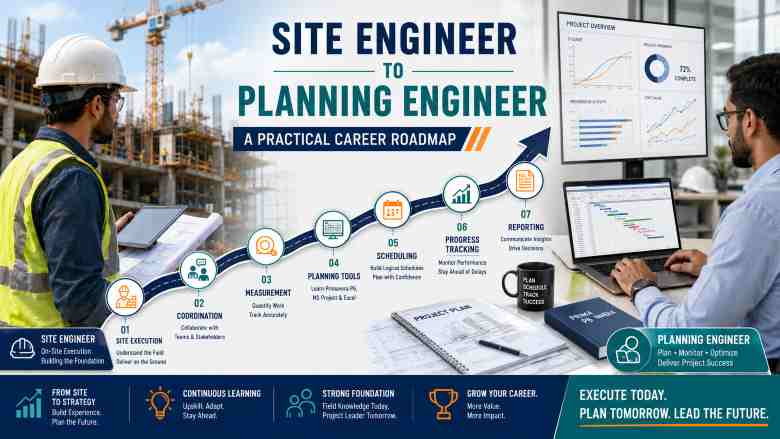
Thinking about moving from site engineer to planning engineer? You are not alone. Thousands of civil engineers across India and the GCC are making this career shift in 2026 — driven by better salaries, structured working hours, and growing demand for scheduling professionals on mega infrastructure, EPC, and real estate projects. This practical guide gives you the complete roadmap: skills to learn, software to master, a 90-day action plan, resume tips, interview preparation, and realistic salary expectations to help you make the transition with confidence.
ConstructionCareerHub App is LIVE — built ONLY for construction careers. Don’t apply with a weak resume.
Get ATS-ready Resume Lab + Interview Copilot + Campus Placement Prep (resume screening, skill gaps, interview readiness) — in minutes & Other advanced features.
Explore Smarter Construction Career Tools →Quick check. Big impact. Start now.
Table of Contents
Quick Answer: How Can a Site Engineer Become a Planning Engineer?
A site engineer can become a planning engineer by learning construction scheduling fundamentals, mastering Primavera P6 and MS Project, building a portfolio of sample schedules, and applying for junior planning or project controls roles. Most successful transitions happen within 3 to 6 months of focused preparation. Site experience in construction sequencing, BOQ understanding, and coordination with subcontractors gives you a genuine advantage over candidates who learn planning only in a classroom.
Why Planning Engineering Is One of the Smartest Career Moves in 2026
If you are a site engineer reading this, chances are you already know the reality of site execution work — long hours in the sun, weekend duties, remote project locations, and a career growth path that often feels frustratingly slow. You are not alone. Thousands of civil and site engineers across India, the Gulf, and international construction markets face the same challenge every year.
Here is what is changing in 2026. The construction industry is experiencing a massive expansion in project controls and scheduling demand. Large infrastructure projects — metro rail, highways, airports, data centres, renewable energy plants, oil and gas facilities, and GCC mega-projects driven by Saudi Vision 2030 — all require dedicated planning engineers who can manage schedules, track progress, coordinate resources, and deliver projects on time.
Digital construction and data-driven project management are accelerating this demand further. Employers are no longer looking for engineers who can only supervise concrete pours. They want professionals who can read a Gantt chart, run a critical path analysis, build a Power BI dashboard, and present project status to senior management. Planning engineering sits right at the centre of this shift, and site engineers are uniquely positioned to make this transition successfully.
This guide gives you the complete, practical roadmap — from understanding what a planning engineer actually does, to the exact software you should learn first, a 90-day action plan, resume conversion tips, interview preparation, and realistic salary expectations for India and the GCC.
What Does a Planning Engineer Do?
A planning engineer is responsible for creating, managing, and monitoring the project schedule throughout the construction lifecycle. While the role varies slightly depending on company size and project type, the core responsibilities remain consistent across EPC, real estate, infrastructure, and industrial construction projects.
Planning engineers develop the project schedule using work breakdown structures (WBS) and scheduling software such as Oracle Primavera P6 or Microsoft Project. They prepare baseline schedules that define the planned sequence of construction activities from mobilisation to handover. On a weekly and monthly basis, they update actual progress against the baseline, calculate schedule variances, and produce progress reports including S-curves, manpower histograms, and earned value metrics.
Beyond scheduling, planning engineers prepare lookahead plans — typically 2-week or 4-week rolling schedules — that help site teams prioritise activities. They coordinate with site engineers, procurement teams, design teams, and subcontractors to ensure activity sequencing is realistic and achievable. When delays occur, the planning engineer performs delay analysis, identifies root causes, and recommends recovery measures. They also support commercial teams with extension-of-time claims and contractual documentation.
In larger organisations and EPC projects, planning engineers contribute to resource planning, cost-schedule integration, risk analysis, and MIS reporting for senior management. The role requires both technical scheduling knowledge and strong communication skills, since planning engineers act as the bridge between site execution and project management.
Site Engineer vs Planning Engineer: Key Differences
| Aspect | Site Engineer | Planning Engineer |
|---|---|---|
| Work Location | Primarily on-site, outdoor | Site office or head office, indoor |
| Main Responsibilities | Execution, quality checks, labour supervision, material coordination | Scheduling, progress tracking, delay analysis, MIS reporting |
| Primary Tools | AutoCAD, Total Station, measuring instruments, Excel | Primavera P6, MS Project, Advanced Excel, Power BI |
| Reporting Style | Daily progress reports, site diaries, RFIs | Weekly/monthly schedule reports, S-curves, dashboards |
| Key Skills | Execution knowledge, drawing reading, labour management | Scheduling logic, software proficiency, analytical thinking |
| Career Growth Path | Senior Site Engineer → Project Engineer → Construction Manager | Senior Planning Engineer → Project Controls → Planning Manager |
| Work-Life Balance | Demanding; weekend and overtime work common | More structured; office-based schedule |
| Long-Term Salary Potential | Moderate to high at senior construction management levels | High; project controls and claims roles command premium salaries |
For a broader understanding of how different construction roles compare, explore this detailed guide to 150+ construction job titles and descriptions.
Why Site Engineers Are Well-Suited for Planning Roles
Many site engineers underestimate how valuable their field experience is for a planning career. In reality, site experience is one of the strongest foundations a planning engineer can have. Here is why.
You already understand actual construction sequencing. You know that column reinforcement cannot start before footing concrete achieves stripping strength. You know that block work depends on structural frame completion. This sequencing knowledge — which takes classroom-trained planners months to learn — is something you carry from day one.
You understand productivity rates. After supervising concrete pours, rebar fixing, shuttering, and finishing work, you have an instinctive sense of how long activities take in real conditions, not just theoretical textbook durations. This makes your schedules more realistic and credible.
You have coordinated with subcontractors, procurement teams, and design consultants. You know the real-world challenges — material delays, drawing approval holdups, manpower shortages, rework due to quality issues. These are exactly the constraints a planning engineer must account for when building and updating project schedules.
You can read drawings and BOQs. Understanding structural, architectural, and MEP drawings allows you to create accurate work breakdown structures and verify quantity-based progress — a critical planning function that engineers without site exposure often struggle with.
In short, if you have spent even 1 to 2 years on a construction site, you already possess the foundational domain knowledge that separates a competent planning engineer from a software operator who can use Primavera but cannot build a realistic schedule.
Skills Required to Become a Planning Engineer
Technical Skills
Construction methodology and sequencing — understanding how buildings, roads, bridges, and industrial facilities are actually built, activity by activity. Drawing interpretation — the ability to read structural, architectural, and services drawings and extract relevant information for scheduling. BOQ and quantity estimation basics — understanding how quantities drive progress measurement and billing. Work breakdown structure (WBS) — the skill of decomposing a project into manageable, schedulable activities. Scheduling logic — understanding predecessor-successor relationships, lead and lag, critical path method (CPM), and float. Primavera P6 — the industry-standard scheduling software for EPC, infrastructure, and large-scale projects. MS Project — widely used in real estate, medium-scale projects, and corporate environments. Advanced Excel — pivot tables, VLOOKUP/XLOOKUP, conditional formatting, Gantt chart creation, and data analysis. Power BI basics — creating dashboards for schedule visualisation, progress tracking, and management reporting. Contract basics — understanding clauses related to time, extensions, liquidated damages, and delay claims. Delay analysis — methods such as as-planned vs as-built, impacted as-planned, and time impact analysis.
Soft Skills
Communication and reporting — presenting schedule information clearly to project managers, clients, and stakeholders. Coordination — working across multiple teams including site, design, procurement, contracts, and commercial departments. Analytical thinking — interpreting schedule data, identifying trends, and recommending corrective actions. Attention to detail — ensuring schedule logic, activity durations, and progress data are accurate.
For a deeper look at the skills and certifications that boost construction careers, see the civil engineering career guide and the guide to PMP certification for civil engineers.
Software Roadmap for Site Engineers Moving into Planning
One of the most common questions site engineers ask is: which software should I learn first? Here is the recommended learning sequence, designed to build skills progressively.
Step 1: Advanced Excel (Weeks 1–2). Start here because Excel is used in every planning role. Learn pivot tables, VLOOKUP/XLOOKUP, conditional formatting, data validation, and basic charting. You will use Excel for daily progress tracking, productivity analysis, resource tracking, and report preparation throughout your planning career.
Step 2: Construction Planning Fundamentals (Weeks 2–3). Before touching scheduling software, understand WBS principles, activity sequencing logic, critical path method, float calculations, and baseline scheduling concepts. Use free resources from PMI and AACE International to build theoretical foundations.
Step 3: Primavera P6 (Weeks 3–6). This is the most critical software for planning engineers in EPC, infrastructure, and GCC projects. Learn project setup, activity creation, relationship assignment, scheduling (F9), baseline setting, progress updating, resource loading, and report generation. For entry-level planning roles, you need intermediate proficiency — the ability to build and update a project schedule independently. A structured course such as the Primavera P6 for Civil Engineers Masterclass on Udemy provides a practical, construction-focused learning path.
Step 4: MS Project (Weeks 6–7). MS Project is widely used in real estate companies, corporate project management offices, and medium-scale projects. Learn the basics: task entry, Gantt chart creation, resource assignment, baseline tracking, and progress updating. If you already know Primavera, MS Project is significantly easier to pick up.
Step 5: AutoCAD Drawing Review (Ongoing). You do not need to design in AutoCAD, but you must be able to open, navigate, and extract information from construction drawings for WBS creation and quantity verification.
Step 6: Power BI Basics (Weeks 8–9). Learn to connect Excel and Primavera data to Power BI, create interactive dashboards, and build visual reports. This skill increasingly differentiates planning engineers in competitive job markets. See the detailed guide on Power BI for planning engineers.
Step 7: Project Controls Concepts (Week 10 onwards). Familiarise yourself with earned value management (EVM), cost-schedule integration, and basic claims/delay analysis concepts. These elevate you from a scheduler to a project controls professional.
Complementary courses to consider: Construction Scheduling by Columbia University on Coursera for CPM fundamentals, and the Planning and Control with Oracle Primavera P6 specialisation on Coursera for a comprehensive Primavera learning path.
Build Your Planning Engineer Career with the Right Tools
ConstructionCareerHub.com offers an AI-powered Resume Lab, Interview Copilot, and Career Planner built specifically for construction professionals. Whether you are preparing your first planning engineer resume or practising scheduling interview questions, the platform helps you get job-ready faster.
90-Day Roadmap: Site Engineer to Planning Engineer
This actionable roadmap is designed for site engineers with 1 to 5 years of experience who want to transition into planning roles within 90 days of focused preparation.
Phase 1: Foundation Building (Days 1–30)
Days 1–15: Planning Fundamentals. Study WBS principles and practice breaking down a real project (residential building or road project) into schedulable activities. Review BOQ documents from your current or past projects and understand how quantities link to activity progress measurement. Practise reading structural and architectural drawings with a focus on construction sequencing. Learn the basics of CPM, float, and predecessor-successor relationships using pen-and-paper exercises.
Days 16–30: Excel Reporting and Productivity Tracking. Build an Excel-based daily progress report template. Create a productivity tracker that calculates planned vs actual output for common activities (concrete, rebar, block work, plastering). Learn pivot tables and VLOOKUP to summarise weekly progress data. Prepare a simple Excel Gantt chart for a small project or project phase.
Phase 2: Software Proficiency (Days 31–60)
Days 31–45: Primavera P6 Fundamentals. Install Primavera P6 (trial version or educational licence). Complete a structured online course — the Primavera P6 Construction Management Planning and Scheduling course on Udemy is a practical starting point. Learn project setup, EPS and OBS configuration, activity creation, relationship assignment, and scheduling (forward and backward pass). Build a sample schedule for a project you have worked on.
Days 46–60: Building Sample Schedules. Create a complete baseline schedule for a residential building project (200–500 activities) in Primavera P6. Include WBS, activity codes, calendars, relationships, and resource assignments. Practise scheduling with F9 and resolving open-ended activities, negative float, and logic errors. Create the same project in MS Project to understand the differences between the two tools.
Phase 3: Portfolio and Job Readiness (Days 61–90)
Days 61–75: Progress Updating and Reporting. Update your sample schedule with simulated progress data. Generate S-curves, manpower histograms, and earned value reports. Prepare a 2-week lookahead plan from your schedule. Create an Excel-based delay tracker and practise identifying critical path delays. Build a simple Power BI dashboard connected to your schedule data.
Days 76–90: Resume, Portfolio, and Interview Preparation. Rewrite your resume converting site experience into planning-relevant language (see resume tips below). Compile your portfolio files (see portfolio section). Prepare answers for common planning engineer interview questions. Update your LinkedIn profile with planning and project controls keywords. Begin applying for junior planning engineer and assistant planning engineer roles. Use the GCC construction CV keyword guide if targeting Gulf jobs.
How to Build a Planning Engineer Portfolio
A portfolio demonstrates your practical skills far more effectively than a resume alone. Prepare the following sample files using data from projects you have worked on (anonymised if required by confidentiality agreements).
Sample baseline schedule — a Primavera P6 or MS Project file with 150 to 500 activities, complete WBS, relationships, and calendars. WBS structure document — a clear breakdown of project scope into phases, disciplines, and activities. Two-week lookahead plan — a short-term schedule showing planned activities, responsible parties, and constraints. Monthly progress report — a formatted report including narrative, progress percentage, S-curve, and key issues. S-curve chart — planned vs actual progress curve generated from your schedule. Manpower histogram — a resource histogram showing planned manpower deployment across project duration. Equipment deployment chart — if applicable, showing equipment allocation across project phases. Delay tracker — an Excel-based log tracking delay events, causes, responsible parties, and impact on critical path. Excel dashboard — a summary dashboard with key project metrics, progress charts, and RAG status indicators. Power BI dashboard — if possible, a simple interactive dashboard showing schedule and progress data.
Store these in a well-organised folder and be prepared to walk through them during interviews. Planning engineering interviews increasingly include portfolio reviews, especially for candidates transitioning from site roles.
Planning Engineer Resume Tips for Site Engineers
The biggest mistake site engineers make when applying for planning roles is submitting the same resume they use for site positions. Your resume must reframe your site experience using planning-relevant language. Here are practical examples of how to convert common site engineer responsibilities into planning-friendly resume bullet points.
Site language: “Supervised concrete pouring and rebar fixing on site.”
Planning language: “Tracked daily site progress across structural activities and coordinated activity-wise updates for project schedule monitoring.”
Site language: “Prepared daily progress reports.”
Planning language: “Prepared quantity-based progress reports aligned with project WBS and supported monthly billing documentation with verified progress data.”
Site language: “Coordinated with subcontractors on site.”
Planning language: “Coordinated with subcontractors to monitor manpower availability, equipment deployment, and material delivery against scheduled activity requirements.”
Site language: “Checked drawings and ensured quality at site.”
Planning language: “Reviewed construction drawings for activity sequencing accuracy and supported lookahead planning by identifying execution constraints and potential delays.”
Include a dedicated “Software Skills” section listing Primavera P6, MS Project, Advanced Excel, AutoCAD, and Power BI with your proficiency level. Add a “Portfolio” or “Sample Work” section mentioning the schedule samples and dashboards you have prepared. For comprehensive resume guidance, refer to the civil engineering resume guide and the construction resume writing tips.
Get Your Resume Job-Ready
The Resume Lab at ConstructionCareerHub.com analyses your resume against actual planning engineer job descriptions, identifies skill gaps, and helps you build an ATS-optimised CV in minutes. It is purpose-built for construction professionals.
Planning Engineer Interview Questions for Site Engineers
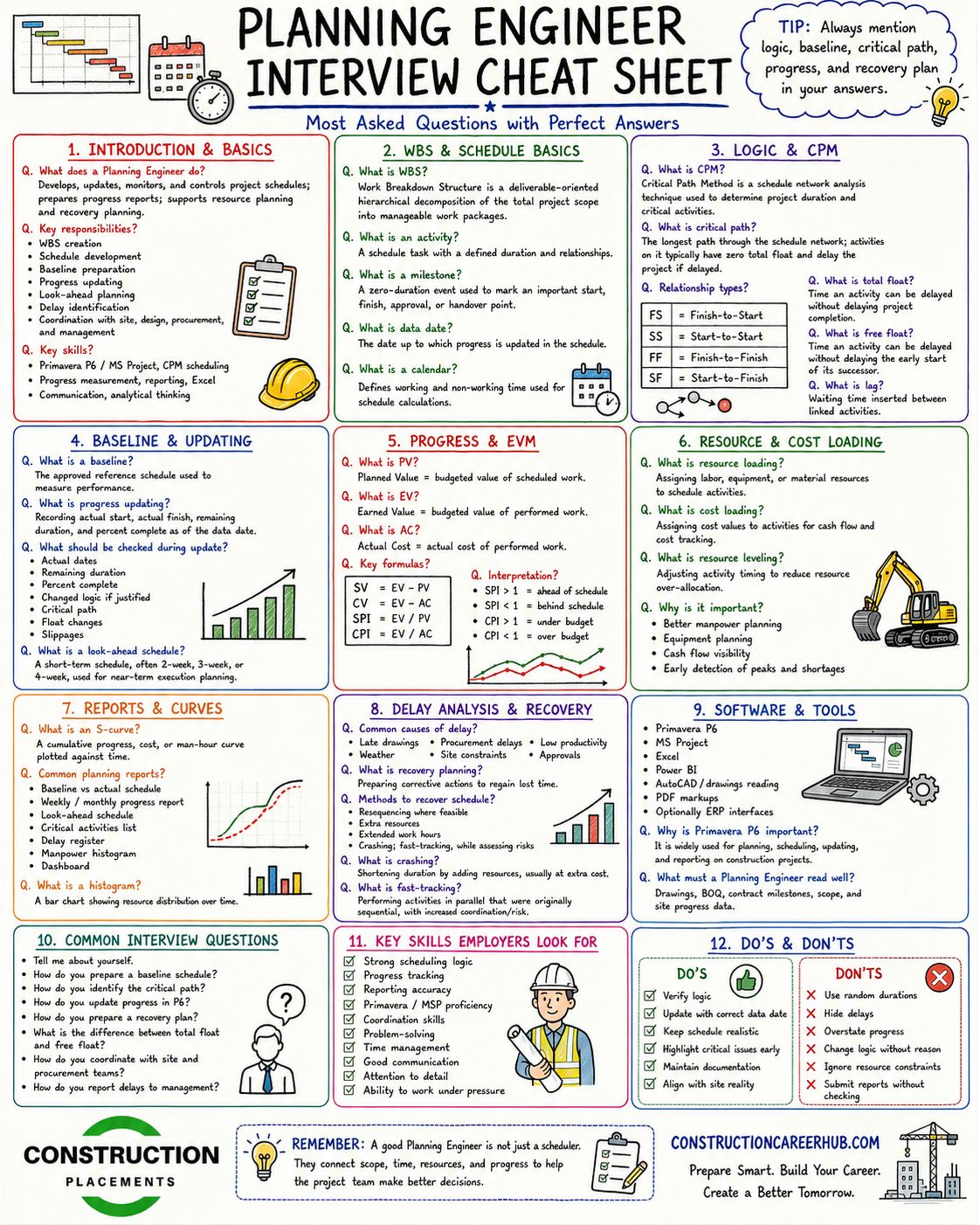
Here are practical interview questions you should prepare for, along with concise sample answers. For a deeper question bank, see the full list of 55 planning engineer interview questions and answers and the top 50 Primavera P6 interview questions.
Q: What is a baseline schedule?
A: A baseline schedule is the approved version of the project schedule that serves as the reference point for measuring progress and identifying variances. It is set after the schedule is reviewed, logic-checked, and accepted by the project team and client.
Q: What is a work breakdown structure (WBS)?
A: WBS is a hierarchical decomposition of the total project scope into manageable work packages. It organises activities by phase, discipline, location, or trade, and forms the backbone of the project schedule.
Q: What is the critical path?
A: The critical path is the longest sequence of dependent activities that determines the minimum project duration. Any delay to a critical path activity directly delays the project completion date.
Q: What is float, and what are its types?
A: Float is the amount of time an activity can be delayed without affecting another activity or the project end date. Total float measures delay impact on the project finish. Free float measures delay impact on the immediate successor only.
Q: What is an S-curve?
A: An S-curve is a graphical representation of cumulative progress over time. It typically shows planned, actual, and forecast progress lines, and is used to identify whether a project is ahead, on track, or behind schedule.
Q: What is a lookahead plan?
A: A lookahead plan is a short-term schedule — usually covering 2 to 4 weeks — that identifies upcoming activities, responsible teams, constraints, required resources, and prerequisites. It is used for weekly coordination meetings.
Q: How do you update progress in Primavera P6?
A: Progress is updated by entering actual start and finish dates for completed activities, remaining duration for in-progress activities, and physical percentage complete. After updating, the schedule is recalculated using F9 to generate updated S-curves and float analysis.
Q: How do you track and analyse delays?
A: I maintain a delay register capturing each delay event with its date, cause, responsible party, duration, and impact on the critical path. For formal analysis, I use methods such as as-planned vs as-built comparison or impacted as-planned analysis.
Q: Why do you want to move from site engineering to planning?
A: My site experience has given me strong construction sequencing knowledge and coordination skills. I want to leverage this foundation in a planning role where I can contribute to project-level schedule management, progress analytics, and project controls — areas that align with my long-term career goal of becoming a project controls professional.
Q: How does your site experience help in planning?
A: Site experience helps me build realistic schedules because I understand actual construction durations, productivity rates, resource constraints, and coordination challenges. I can identify unrealistic schedule assumptions quickly and build lookahead plans that site teams can actually follow.
Salary Scope: Site Engineer vs Planning Engineer
Important disclaimer: Salary figures vary significantly based on country, city, company type (contractor, consultant, PMC, developer), project scale, individual qualifications, software skills, certifications, and negotiation. The ranges below are indicative estimates based on available market data and should not be treated as guaranteed figures. For a comprehensive, data-backed comparison, refer to the Construction Salary Guide 2026.
India
Entry-level site engineers typically earn ₹2.5 to 5 LPA, while entry-level planning engineers start at ₹3.5 to 6 LPA — a modest but meaningful premium reflecting the software skills requirement. At 2 to 5 years of experience, site engineers earn ₹5 to 10 LPA, whereas planning engineers with Primavera P6 proficiency and project controls exposure can command ₹7 to 14 LPA. At senior levels (5+ years), planning managers and project controls professionals in large EPC firms and infrastructure companies earn ₹15 to 30+ LPA, compared to ₹12 to 22 LPA for senior site or construction managers. The salary premium increases significantly with certifications such as PMP, PSP (Planning and Scheduling Professional from AACE), or EVP (Earned Value Professional).
GCC (UAE, Saudi Arabia, Qatar, Oman)
In the Gulf, planning engineers consistently command higher packages than equivalent-level site engineers. Junior planning engineers (2–4 years) earn approximately AED 6,000 to 10,000 per month (tax-free), while senior planning engineers (8+ years) can earn AED 15,000 to 30,000+ per month depending on the employer and project type. Packages typically include housing allowance, transport, annual flights, and medical insurance. For detailed GCC salary benchmarks and job market analysis, see the guide on Gulf construction jobs for Indian professionals and the guide on working in construction abroad.
Best Industries Hiring Planning Engineers
Planning engineers are in demand across virtually every segment of the construction and engineering industry. The sectors with the strongest hiring activity in 2026 include: real estate construction (high-rise residential and commercial projects), EPC projects (oil and gas, petrochemical, refinery), infrastructure (highways, bridges, tunnels, water supply), metro and rail (urban transit, high-speed rail, rail freight), airports and aviation infrastructure, oil and gas upstream and downstream, power plants (thermal and nuclear), renewable energy (solar, wind, green hydrogen, BESS), data centres, industrial projects (manufacturing plants, warehouses, logistics hubs), and large MEP projects requiring integrated scheduling.
For a comprehensive overview of 110 career paths available to civil engineers, including planning and project controls tracks, explore the linked career pathways guide.
Common Mistakes Site Engineers Make While Moving to Planning
Learning only Primavera P6 without understanding construction sequencing. Software is a tool, not a skill. If you cannot logically sequence a building’s construction activities on paper, you will produce unusable schedules regardless of your Primavera proficiency.
Not learning Excel properly. Advanced Excel is used daily in every planning role — for data analysis, progress tracking, report formatting, and ad hoc calculations. Underinvesting in Excel is a common regret among new planning engineers.
Not preparing a portfolio. Sending a resume without sample work puts you at a significant disadvantage against candidates who can demonstrate their scheduling ability with actual outputs.
Using a generic resume. A resume that reads like a site engineer’s CV will not pass the initial screening for planning roles. You must rewrite it using planning-relevant language and highlight software skills prominently.
Not understanding BOQ and quantity-based progress. Planning engineers must understand how physical progress is measured against BOQ quantities. Without this understanding, your progress reports will lack credibility.
Ignoring communication and reporting skills. Planning engineers present schedule data to project directors, clients, and management. If you cannot communicate findings clearly — in writing and in meetings — your technical skills will not be fully valued.
Applying only for senior planning roles without a transition strategy. If you are transitioning from site engineering, target junior planning engineer, assistant planning engineer, or project controls assistant roles first. Build your planning track record for 1 to 2 years before pursuing senior positions.
Best Career Path After Becoming a Planning Engineer
The planning and project controls career track offers clear, well-defined progression with strong salary growth at each stage.
Junior Planning Engineer → Planning Engineer → Senior Planning Engineer → Lead Planning Engineer → Planning Manager → Project Controls Manager → Project Director. Parallel career paths include Project Controls Engineer (cost-schedule integration), Claims and Delay Analyst (commercial and contractual focus), and Scheduling Consultant (independent advisory work).
Engineers with construction project management aspirations often use planning as a stepping stone to broader project management roles, since planning experience provides deep understanding of project lifecycle, schedule risk, and stakeholder coordination.
For a broader look at how civil engineering careers branch out after the first five years, the article on the 5 types of civil engineers after 5 years provides excellent perspective.
Is Planning Engineering Better Than Site Engineering?
This is not a simple better-or-worse comparison. Both career paths are valuable, and the right choice depends on your personal strengths, work style preferences, and long-term career goals.
Planning engineering is likely a better fit if you enjoy analytical work, prefer structured office-based schedules, are interested in project controls, scheduling, and data-driven reporting, and want to build toward managerial roles in project controls or programme management. Planning engineers generally experience better work-life balance, more predictable working hours, and higher salary premiums at mid-to-senior levels — especially in the GCC and international EPC markets.
Site engineering is likely a better fit if you enjoy hands-on construction work, thrive in dynamic outdoor environments, prefer direct involvement in execution and quality control, and want to build toward construction superintendent or construction manager roles. Site experience remains irreplaceable for certain senior leadership roles, and many project directors and construction directors rose through the site engineering track.
The most successful construction professionals often combine both experiences. A few years of site work followed by a transition into planning, and eventually into project controls or project management, creates a well-rounded professional profile that is highly valued by employers globally.
For further reading on construction management careers and construction management courses, explore the linked guides.
Plan Your Construction Career with Confidence
Whether you are a fresher exploring options or a mid-career site engineer ready for a change, ConstructionCareerHub.com provides AI-powered career planning tools, interview practice, skill gap analysis, and salary benchmarking designed exclusively for construction professionals. Start your transition today.
Planning Engineer Career Roadmap Summary
- Assess your current site experience and identify scheduling, coordination, and reporting skills you already possess.
- Learn Advanced Excel for progress tracking, productivity analysis, and reporting.
- Study construction planning fundamentals — WBS, CPM, float, scheduling logic.
- Master Primavera P6 through a structured course and hands-on practice.
- Learn MS Project basics for flexibility across project types.
- Build a portfolio of sample schedules, progress reports, S-curves, and dashboards.
- Rewrite your resume converting site experience into planning-relevant language.
- Prepare for planning engineer interviews using domain-specific questions.
- Apply for junior planning engineer or project controls assistant roles.
- Continue developing skills in Power BI, delay analysis, and earned value management for career advancement.
Key Skills Snapshot
- Construction sequencing and methodology
- Work breakdown structure (WBS)
- Critical path method (CPM) and scheduling logic
- Oracle Primavera P6
- Microsoft Project
- Advanced Excel (pivot tables, VLOOKUP, charting)
- Drawing and BOQ interpretation
- Progress measurement and S-curve analysis
- Lookahead planning and delay tracking
- Power BI dashboards
- Communication, coordination, and MIS reporting
Recommended Resources for Your Transition
These carefully selected resources support different stages of your site-to-planning transition.
Industry Organisations: Project Management Institute (PMI) for project management standards and certifications. AACE International for project controls, cost engineering, and the PSP (Planning and Scheduling Professional) certification. Chartered Institute of Building (CIOB) for construction management professional development. RICS for quantity surveying and project management qualifications with international recognition.
Software: Oracle Primavera P6 — the official product page for downloading trial versions and accessing documentation.
Ebooks for Career Preparation: Civil Engineering Interview Questions and Answers PDF eBook — 102 technical questions for freshers and site engineers preparing for interviews. Comprehensive Civil Engineering Job Interview Guide with 300 Q&A — an in-depth interview preparation resource covering all major civil engineering disciplines. Construction Career Mastery eBook Collection — a complete career toolkit covering interviews, resumes, and career strategy across multiple construction roles. Remote and GCC Job Hunting Playbook — practical guidance for engineers applying to Gulf construction positions from India, including CV templates and recruiter outreach strategies.
Further Reading on ConstructionPlacements.com: Top construction management courses in India for engineers considering formal postgraduate education. Best quantity surveying courses for engineers interested in the commercial side of construction. BIM for construction management and planning for engineers who want to add digital construction skills to their profile.
Final Career Roadmap
The transition from site engineering to planning engineering is one of the most practical, high-return career moves available to civil engineers in 2026. You do not need an MBA, a postgraduate degree, or years of additional education. What you need is focused effort over 90 days: learn Excel properly, understand construction scheduling logic, gain working proficiency in Primavera P6, build a small but credible portfolio, rewrite your resume, and start applying.
Your site experience is not a limitation — it is your competitive advantage. Use it. The construction industry needs planning engineers who understand how buildings are actually built, not just how to click buttons in scheduling software. If you can combine field knowledge with scheduling proficiency and clear communication skills, you will find that the planning engineering career path offers better working conditions, stronger salary growth, and a clear trajectory toward project controls and project management leadership.
Start today. Open Excel, break down your current project into a WBS, and schedule your first Primavera P6 course. Ninety days from now, you could be interviewing for your first planning role.
Frequently Asked Questions
Can a site engineer become a planning engineer?
Yes. Site engineers are well-suited for planning roles because they understand construction sequencing, productivity rates, and coordination challenges. With focused learning in scheduling software (Primavera P6, MS Project) and planning fundamentals, most site engineers can make this transition within 3 to 6 months.
How many years of site experience are needed to become a planning engineer?
There is no strict minimum. Engineers with 1 to 2 years of site experience can transition to junior planning roles. Having 2 to 5 years of site experience is ideal, as it provides enough domain knowledge to build credible schedules and communicate effectively with site teams.
Is Primavera P6 compulsory for planning engineer jobs?
For EPC, infrastructure, oil and gas, and GCC projects, Primavera P6 proficiency is nearly always required. For real estate and corporate projects, MS Project may suffice. Learning both is recommended, with Primavera P6 as the priority for serious career growth.
Which is better — site engineer or planning engineer?
Neither is objectively better. Planning offers better work-life balance, higher salary potential at mid-to-senior levels, and a path to project controls management. Site engineering offers hands-on execution experience and a path to construction management leadership. The best choice depends on your personal preferences and career goals.
What is the salary of a planning engineer?
In India, planning engineers earn approximately ₹3.5 to 6 LPA at entry level and ₹7 to 14 LPA at 2 to 5 years of experience. In the GCC, junior planning engineers earn AED 6,000 to 10,000 per month (tax-free). Salaries vary significantly by employer, project type, location, and certifications held.
Can fresh civil engineers become planning engineers?
Yes, but it is more challenging without site experience. Freshers should ideally gain 6 to 12 months of site exposure before transitioning, or target graduate trainee programmes in planning departments of large EPC or infrastructure companies.
What skills are required for planning engineer jobs?
Core skills include construction sequencing knowledge, Primavera P6 or MS Project proficiency, advanced Excel, WBS and CPM understanding, drawing interpretation, progress tracking, delay analysis, and strong communication and reporting abilities.
Is MS Project enough for planning engineer roles?
MS Project is sufficient for some real estate and corporate positions. However, for EPC, infrastructure, and GCC projects — which represent the largest and highest-paying segment of planning engineer jobs — Primavera P6 is the industry standard and typically required.
How do I prepare a planning engineer resume?
Rewrite your site experience using planning-relevant language. Highlight scheduling, progress tracking, coordination, and reporting activities. Include a dedicated software skills section listing Primavera P6, MS Project, Excel, and Power BI. Attach or mention a portfolio of sample schedules and reports.
Are planning engineers in demand in the GCC?
Yes, strongly. Saudi Vision 2030 mega-projects, UAE infrastructure expansion, and ongoing development across Qatar and Oman are driving high demand for planning engineers, especially those with Primavera P6 proficiency and EPC or infrastructure project experience.
