

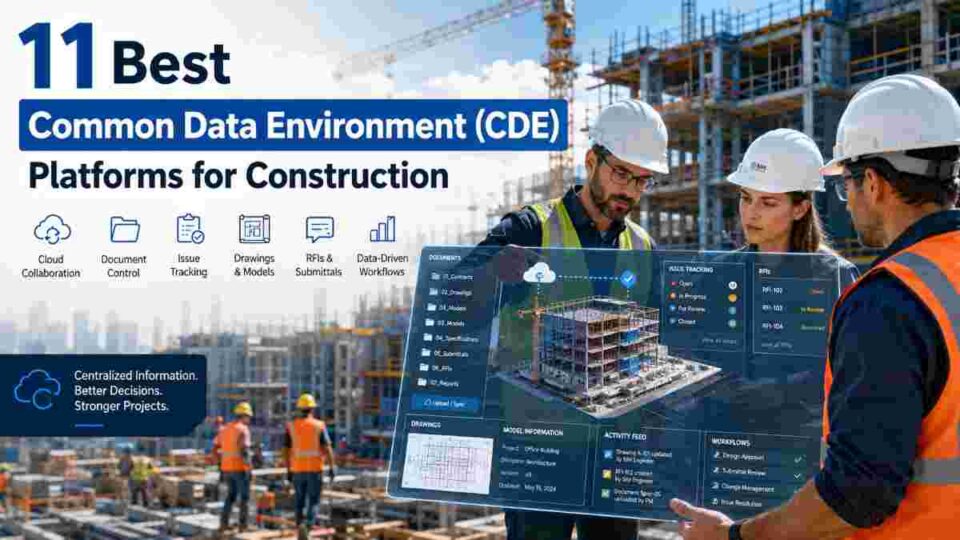
Last Updated on May 22, 2026 by Admin
If you have ever wasted hours chasing the latest drawing revision, reconciling conflicting document versions across email threads, or explaining to a subcontractor that they built from an outdated specification, you already understand why the construction industry is moving toward centralized data management at an unprecedented pace.
ConstructionCareerHub App is LIVE — built ONLY for construction careers. Don’t apply with a weak resume.
Get ATS-ready Resume Lab + Interview Copilot + Campus Placement Prep (resume screening, skill gaps, interview readiness) — in minutes & Other advanced features.
Explore Smarter Construction Career Tools →Quick check. Big impact. Start now.
A Common Data Environment (CDE) solves these problems by giving every stakeholder — from the architect drafting the initial concept to the facilities manager maintaining the finished asset — a single, governed digital workspace where project information is stored, shared, approved, and archived through structured workflows.
With ISO 19650 now mandated or strongly encouraged across markets including the UK, EU, Australia, and parts of the Middle East, choosing the right CDE platform is no longer a nice-to-have technology decision — it is a compliance requirement and a career-shaping skill for construction professionals in 2026.
In this guide, we review the 11 best Common Data Environment platforms for construction, comparing their features, ideal use cases, BIM integration depth, ISO 19650 compliance capabilities, and pricing models to help you select the platform that fits your project needs and career trajectory.
🔧 Build Your Digital Construction Career: Understanding CDE platforms is now a core competency for BIM managers, document controllers, and digital construction managers. Explore AI-powered career tools at ConstructionCareerHub.com — including the Resume Lab and Interview Copilot — to position yourself for these high-demand roles.
Table of Contents
What Is a Common Data Environment (CDE)?
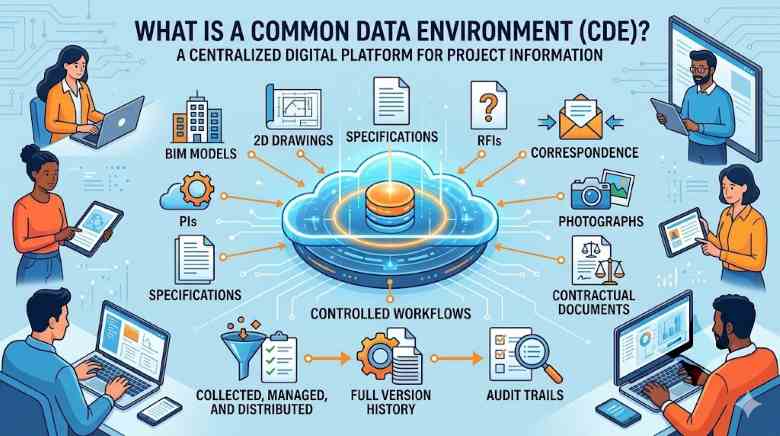
A Common Data Environment is a centralized digital platform where all project-related information — BIM models, 2D drawings, specifications, RFIs, correspondence, photographs, and contractual documents — is collected, managed, and distributed through controlled workflows with full version history and audit trails.
The concept was formalized in the UK’s BS 1192 standard in 2007 and has since evolved into the international ISO 19650 series, which defines the CDE as the “agreed source of information for any given project or asset, for collecting, managing and disseminating each information container through a managed process.”
Under ISO 19650, a compliant CDE must support four information states:
- Work in Progress (WIP) — Information being developed by the task team, not yet visible to others
- Shared — Information approved for sharing with other project teams for coordination and review
- Published — Information authorized for use in construction, procurement, or facility management
- Archived — Historical record providing a complete audit trail of information development
It is important to understand that a CDE is not simply cloud storage. Platforms like Dropbox or Google Drive lack the BIM-specific model viewers, structured approval workflows, issue tracking, status code management, and audit trail capabilities that define a true CDE. The distinction is fundamental: a CDE combines a technology solution (the platform) with a defined workflow (the process) to manage information throughout the project lifecycle.
For a deeper understanding of how BIM underpins CDE workflows, read our comprehensive guide on the uses and benefits of BIM in construction projects.
Why CDE Platforms Matter in 2026
The construction industry generates enormous volumes of data across fragmented teams, and mismanaged information remains one of the largest sources of waste. Research consistently shows that poor data management and miscommunication contribute to 20–25% cost overruns on typical construction projects. Here is why CDE adoption is accelerating:
- Regulatory Mandates: The UK’s BIM Level 2 mandate, the EU’s growing ISO 19650 adoption, and Australia’s Digital Engineering Framework all require or strongly encourage CDE usage on public sector projects.
- Rework Reduction: Centralized, version-controlled documents prevent teams from building from outdated information, which is the single largest cause of preventable rework.
- AI and Digital Twin Integration: Modern CDEs increasingly serve as the data backbone for AI-powered risk analytics, automated clash detection, and digital twin platforms.
- Career Relevance: A project manager who cannot navigate a CDE or a site engineer unfamiliar with ISO 19650 compliance is at a significant disadvantage in the 2026 job market.
- Supply Chain Coordination: Large infrastructure projects routinely involve multiple CDEs across the supply chain. Platforms that support interoperability and cross-CDE synchronization are becoming essential.
For professionals seeking to future-proof their careers in this environment, our analysis of the construction talent mismatch crisis in 2026 explains why digital skills like CDE proficiency command salary premiums.
How We Evaluated These CDE Platforms
Each platform in this list was assessed across the following criteria to ensure a practical, fair comparison:
- ISO 19650 Compliance: Support for WIP/Shared/Published/Archived states, naming conventions, and audit trails
- BIM Integration Depth: Native model viewing, IFC support, clash detection, and authoring tool interoperability
- Document Management: Version control, metadata handling, transmittal workflows, and drawing register capabilities
- Field and Mobile Access: Usability for on-site teams accessing models, drawings, and issue logs via mobile devices
- Scalability: Suitability for small firms versus enterprise-scale, multi-project portfolios
- Pricing Transparency: Whether pricing is publicly available and how licensing is structured
- Market Adoption: Real-world usage across global markets, validated by industry reports and user reviews
11 Best Common Data Environment Platforms for Construction in 2026
Below is a quick comparison summary, followed by detailed reviews of each platform.
| Platform | Developer | Best For | ISO 19650 | Pricing |
|---|---|---|---|---|
| Autodesk Construction Cloud | Autodesk | Full-lifecycle BIM + project management | ✅ Yes | Custom quote |
| Bentley ProjectWise | Bentley Systems | Large infrastructure & civil engineering | ✅ Yes | Custom quote |
| Oracle Aconex | Oracle | Document control on mega-projects | ✅ Yes | Custom quote |
| Trimble Connect | Trimble | Cross-platform BIM model aggregation | ✅ Yes | Free tier + paid plans |
| Procore | Procore Technologies | All-in-one construction management | Partial | Custom quote |
| Dalux Box | Dalux | BIM field operations & site documentation | ✅ Yes | Free BIM Viewer + paid modules |
| Viewpoint For Projects | Trimble | ISO 19650 document management (UK/EU) | ✅ Yes | Custom quote |
| Asite | Asite | Enterprise project collaboration | ✅ Yes | Custom quote |
| Thinkproject | Thinkproject | European infrastructure & compliance | ✅ Yes | Custom quote |
| BIMcollab | BIMcollab | BIM issue management & model checking | ✅ Yes | Free tier + paid plans |
| Revizto | Revizto | Model-based coordination & issue tracking | ✅ Yes | Subscription-based |
1. Autodesk Construction Cloud (ACC)
Website: construction.autodesk.com
Now a part of Autodesk Forma, Autodesk Construction Cloud is the most widely adopted CDE platform globally, and for good reason. ACC (formerly the BIM 360 ecosystem) unifies design collaboration, model coordination, document management, cost management, and field execution into a single cloud-based environment. Its deep integration with Autodesk’s authoring tools — Revit, Civil 3D, Navisworks, and AutoCAD — gives it an unmatched advantage for teams already embedded in the Autodesk ecosystem.
Key CDE Features:
- Centralized document management with automated drawing extraction and version control
- Native BIM model viewing with federated model coordination and automated clash detection
- ISO 19650-compliant workflows with configurable status codes, approval gates, and transmittals
- AI-powered risk analytics (Autodesk Construction IQ) for safety and quality prediction
- Integrated RFI, submittal, and change order management
- Robust API ecosystem with 200+ integration partners
- Mobile app for field teams with offline access to models and drawings
What Sets It Apart: In 2026, ACC introduced the AI-powered Autodesk Assistant, enabling project teams to query their project data through a conversational interface. The platform now delivers over 40 feature releases per quarter, including model-based progress tracking and enhanced cost forecasting tools. ACC is now part of the broader Autodesk Forma ecosystem.
Ideal For: Mid-to-large construction firms, general contractors, and owner-operators managing complex building projects who are already using Autodesk design tools.
Limitations: Pricing can be prohibitive for smaller firms. Users frequently report that the per-user licensing model and add-on fees make it one of the more expensive options. File uploads for very large models can also be time-consuming.
Pricing: Custom quotes based on project volume and module selection. No public pricing is listed; teams should request a tailored plan from Autodesk sales.
For a deeper dive into the Autodesk ecosystem, see our complete guide to Autodesk BIM 360 and our 20 best BIM software comparison for 2026.
2. Bentley ProjectWise
Website: bentley.com/software/projectwise
Bentley ProjectWise is the CDE of choice for large-scale civil infrastructure, transportation, water, and energy projects. While ACC dominates the vertical building market, ProjectWise is purpose-built for the complex, multi-discipline, multi-phase data requirements of horizontal infrastructure where file volumes are massive and supply chains are deeply fragmented.
Key CDE Features:
- Enterprise-grade document management with application-level integration for MicroStation, OpenRoads, OpenBuildings, and other Bentley tools
- Automated design change synchronization across distributed teams
- ISO 19650-compliant deliverables management with full audit trails and graphical workflow automation
- Advanced clash detection and version comparison through integrated SYNCHRO capabilities
- Component Center for reusable design objects and standardization
- Digital twin connectivity via iTwin Platform for lifecycle asset management
- GIS integration for geospatially referenced project information
What Sets It Apart: Bentley reports that ProjectWise has improved collaborative efficiency by 25% on connected infrastructure projects. Its BCDE (Bentley Common Data Environment) cloud offering provides flexible data, document, and spatial information management optimized for infrastructure portfolios spanning unlimited projects and programs.
Ideal For: Government transportation departments, large engineering consultancies, infrastructure owners, and EPC contractors working on roads, rail, bridges, water networks, and power infrastructure.
Limitations: The learning curve is steeper than building-focused CDEs. The platform is most effective within the Bentley ecosystem; interoperability with non-Bentley authoring tools, while supported, requires more configuration.
Pricing: Custom enterprise pricing. Bentley uses a consumption-based licensing model through its Virtuosity program.
3. Oracle Aconex
Website: oracle.com/aconex
Oracle Aconex is the industry’s leading cloud solution for document control and project collaboration on large, complex construction programs. With over 5 million project users globally, Aconex is especially dominant in the infrastructure, mining, oil and gas, and government sectors where rigorous document control, data immutability, and legal defensibility are non-negotiable.
Key CDE Features:
- Advanced version control with data immutability and a unique data ownership model where each organization retains control of its submitted information
- Comprehensive document management with automated workflows, transmittals, and correspondence tracking
- BIM management capabilities with model viewing and coordination tools
- Suitability status classification and revision control for ISO 19650 compliance
- Bid and tender management for procurement workflows
- Quality and safety oversight modules
- Enterprise-grade security and audit trail for legal and contractual compliance
What Sets It Apart: Aconex’s data ownership model is unique in the market — each contributing organization maintains ownership of its information, which provides legal clarity on multi-stakeholder mega-projects. This makes it particularly favored for PPP (Public-Private Partnership) and government-funded projects where accountability is paramount.
Ideal For: Mega-project owners, government clients, mining and resources companies, and large-tier contractors where document control compliance and legal audit trails are the top priority.
Limitations: The BIM model viewing experience is less sophisticated than Autodesk or Bentley’s native solutions. Some users report that interoperability with third-party design tools could be improved. The platform’s depth can feel over-engineered for smaller, simpler projects.
Pricing: Custom enterprise pricing through Oracle sales.
4. Trimble Connect
Website: connect.trimble.com
Trimble Connect is a cross-platform BIM collaboration tool that excels at model aggregation — bringing together models from different authoring tools (Revit, Tekla Structures, SketchUp, ArchiCAD, and more) into a single federated viewing environment. It functions as a vendor-neutral CDE that connects the right people with the right data at the right time.
Key CDE Features:
- Cross-platform model aggregation supporting IFC, DWG, DGN, SKP, and native Tekla formats
- Cloud-based and on-premise deployment options
- 3D model viewing with measurement, sectioning, and annotation tools
- Task management and issue tracking linked to model elements
- Document management with version control and folder-based organization
- Integration with Trimble’s hardware ecosystem (total stations, GPS, and laser scanners)
- Free personal tier available for individual users
What Sets It Apart: Trimble Connect’s vendor-neutral approach makes it an excellent choice for projects where the design team uses mixed software environments. Its integration with Trimble’s survey and construction hardware creates a unique field-to-office data loop that other CDEs cannot match.
Ideal For: Structural engineering firms using Tekla, projects with mixed BIM authoring environments, and contractors who use Trimble field hardware.
Limitations: Document management and workflow automation capabilities are less mature than dedicated document control platforms like Aconex or Viewpoint For Projects.
Pricing: Free personal plan available. Business and enterprise plans are priced per user with project-based options.
5. Procore
Website: procore.com
Procore is the world’s most widely used construction management platform, and while it was not originally designed as a CDE in the ISO 19650 sense, its comprehensive document management, drawing management, and collaboration capabilities make it a de facto CDE for many general contractors and construction managers, particularly in North America and Australia.
Key CDE Features:
- Centralized document management with folder structures, version control, and permission controls
- Drawing management with automated revision tracking, comparison tools, and hyperlinked drawing sets
- RFI and submittal workflows with full audit trails
- BIM model viewing through integrated partnerships
- Quality and safety management with configurable inspection checklists
- Financial management including budgeting, change orders, and invoicing
- Extensive marketplace with 500+ technology integrations
- Mobile app ranked among the highest in construction for field usability
What Sets It Apart: Procore’s strength is its breadth — it covers project management, financial management, quality, safety, and workforce management in a single platform. For teams that need a unified operational platform rather than a specialized BIM-focused CDE, Procore is often the pragmatic choice.
Ideal For: General contractors, construction managers, and specialty contractors who prioritize operational project management alongside document control, particularly in the North American market.
Limitations: Procore’s CDE workflows are not as deeply aligned with ISO 19650 as purpose-built CDEs like Viewpoint For Projects or Asite. BIM coordination capabilities are more limited compared to ACC or Trimble Connect.
Pricing: Custom pricing based on annual construction volume. Procore does not publicly list per-user pricing.
For broader context on construction project management platforms, see our list of the best construction project management software for 2026.
6. Dalux Box
Website: dalux.com
Dalux is a Danish construction software company that has emerged as a European BIM leader, with 1.7 million active accounts and annual revenue surpassing $100 million as of 2024 — achieved entirely through organic growth with no external investment. Dalux Box is its core collaboration and CDE platform, designed to make BIM data genuinely accessible to field teams through an intuitive, mobile-first interface.
Key CDE Features:
- Dalux BIM Viewer: Free tool supporting large-scale IFC models, technical drawings, and cross-platform viewing on desktop and mobile
- Dalux Box (CDE): Centralized collaboration platform with folder management, review/approval workflows, and 2D/3D data sharing
- Dalux Field: On-site quality control, safety management, and real-time progress tracking linked directly to BIM models
- Dalux Tender: Procurement workflow management with template-based tender returns and centralized Q&A
- SiteWalk: 360° photo documentation using helmet-mounted cameras for visual progress tracking linked to BIM models
- Free plugins for Revit, Solibri, ArchiCAD, Navisworks, and Tekla
What Sets It Apart: Dalux’s growth has been driven by making BIM technology genuinely accessible to field workers, not just BIM managers. The SiteWalk feature — which allows teams to capture 360° site documentation and overlay it on BIM models — has been adopted by major UK contractors including John Sisk & Son, Willmott Dixon, and Wates. The free BIM Viewer also serves as an effective entry point that draws teams into the broader Dalux ecosystem.
Ideal For: European contractors, design teams seeking an affordable BIM-centric CDE, and any project team that needs strong field-to-model connectivity without enterprise-level pricing.
Limitations: Viewpoint sharing and 3D collaboration features could be more refined. Project setup and settings configuration can be initially confusing for administrators.
Pricing: Free BIM Viewer available. Dalux Box and Field modules are priced per project or per organization — generally more affordable than Autodesk Construction Cloud.
7. Viewpoint For Projects (VFP)
Website: trimble.com/viewpoint-for-projects
Viewpoint For Projects (VFP), now part of Trimble, is the UK’s most popular Common Data Environment and has served over 500,000 construction professionals. It is a cloud-based, web and mobile CDE specifically designed for ISO 19650-compliant construction project information management. While its interface is not the most visually modern, its workflow engine, security model, and document control capabilities are deeply respected by document controllers and BIM information managers.
Key CDE Features:
- Full ISO 19650 compliance with configurable suitability status codes, naming convention enforcement, and revision control
- 3D model viewing with COBie generator for asset handover data
- Virtual containers for organizing information across project stages
- Primary and secondary file format management for drawing packages
- Automated workflow engine for approvals, transmittals, and distribution
- Public link sharing for external stakeholder access
- Robust security with granular access controls and complete audit trails
What Sets It Apart: VFP’s naming convention enforcement is one of the most rigorous in the market — it can be configured to reject uploads that do not conform to the project’s naming protocol, which is a critical ISO 19650 requirement that many CDEs handle less strictly.
Ideal For: UK and European projects with strict ISO 19650 requirements, public sector clients, and organizations where document control rigor is the primary concern.
Limitations: The user interface looks somewhat dated compared to newer platforms. The depth of settings and access control configuration can be complex to manage.
Pricing: Custom pricing through Trimble sales. Typically project-based licensing.
8. Asite
Website: asite.com
Asite is a UK-headquartered enterprise collaboration platform that provides CDE, BIM management, project controls, and supply chain management for construction and infrastructure projects. It has a strong presence on UK government-funded projects and is widely used by tier-one contractors across Europe and the Middle East.
Key CDE Features:
- Document management with ISO 19650-compliant workflows, status codes, and transmittals
- BIM model management with federated model viewing and issue tracking
- Supply chain management and procurement tools
- Project controls including cost management and change order tracking
- Digital engineering solutions with Common Data Environment workflow automation
- Field collaboration tools for site teams
- Integration with major BIM authoring tools and third-party platforms
What Sets It Apart: Asite’s combined CDE and supply chain management capability makes it particularly effective for main contractors managing complex subcontractor networks. The platform has been used on landmark UK projects and is frequently specified by government clients alongside Viewpoint For Projects.
Ideal For: Tier-one UK and European contractors, government infrastructure clients, and organizations that need combined document control and supply chain management in a single platform.
Limitations: The platform has a steeper learning curve for smaller teams unfamiliar with enterprise CDE workflows. Market presence outside the UK and Europe is more limited.
Pricing: Custom enterprise pricing. Contact Asite sales for project-specific or organizational licensing.
9. Thinkproject
Website: thinkproject.com
Thinkproject is a European construction technology company that provides CDE, BIM management, and QHSE (Quality, Health, Safety, and Environment) solutions for infrastructure, building, and energy projects. In 2026, Thinkproject launched its new Field Manager product for construction site management alongside enhanced BIM collaboration capabilities.
Key CDE Features:
- Common Data Environment with ISO 19650-compliant document management and workflow automation
- VDC Collaboration and VDC Manager for visual design coordination
- QHSE management modules for quality assurance and safety compliance
- Defect and snag management with mobile field tools
- Cost control and project controls integration
- Configurable approval workflows with full audit trails
- Integration with BIM authoring tools and enterprise systems
What Sets It Apart: Thinkproject’s focus on the European infrastructure market — particularly in Germany, the Nordics, and the UK — gives it deep expertise in the regulatory and compliance requirements specific to European construction. Its combined CDE and QHSE offering is distinctive in the market.
Ideal For: European infrastructure contractors, energy and utilities companies, and organizations that need combined CDE and quality/safety management.
Limitations: Less well-known in North American, Middle Eastern, and Asian markets. The BIM model viewing experience is less sophisticated than Autodesk or Dalux.
Pricing: Custom pricing based on project scope and module selection.
10. BIMcollab
Website: bimcollab.com
BIMcollab takes a different approach to the CDE market. Rather than trying to be an all-in-one project management platform, BIMcollab focuses specifically on BIM issue management, model checking, and openBIM collaboration. It is one of the most widely used BCF (BIM Collaboration Format) platforms in the world, enabling teams to manage model-based issues across any combination of BIM authoring tools.
Key CDE Features:
- BIMcollab Nexus: Cloud-based issue management platform using the open BCF standard for cross-platform BIM coordination
- BIMcollab Zoom: Desktop IFC model viewer with built-in model checking, clash detection, and rule-based validation
- BIMcollab Twin: CDE module for managing project documents and models with ISO 19650-aligned workflows
- Plugins for Revit, ArchiCAD, Navisworks, Tekla, Solibri, and SimpleBIM
- Smart filtering, property analysis, and automated model quality checks
- Free plan available for small teams
What Sets It Apart: BIMcollab’s commitment to openBIM standards makes it the platform of choice for teams working in mixed-software environments. Its BCF-based issue management allows stakeholders using different authoring tools to coordinate issues through a single, neutral platform — something that proprietary CDEs often struggle with.
Ideal For: BIM coordinators and managers in multi-discipline design teams, organizations committed to openBIM workflows, and firms that need specialized model checking alongside basic CDE functionality.
Limitations: BIMcollab Twin (the CDE module) is newer and less mature than the issue management platform. Document management and field workflows are not as comprehensive as full-featured CDEs like ACC or Aconex.
Pricing: Free plan available with limited features. Paid plans start at accessible per-user rates, making it one of the most affordable options for BIM coordination.
11. Revizto
Website: revizto.com
Revizto combines model-based coordination with issue tracking and field access in a single, real-time collaborative environment. It focuses on making BIM coordination faster and more visual by providing a game-engine-powered 3D environment where teams can walk through federated models, create and assign issues, and track resolution — all without needing specialized BIM software skills.
Key CDE Features:
- Real-time federated model viewing powered by a game engine for smooth 3D navigation
- Issue tracking and management linked directly to 3D model locations
- Automated clash detection and clash grouping across disciplines
- 2D sheet viewing with markup and annotation tools
- VR (virtual reality) support for immersive design review
- Cloud-based synchronization across desktop, mobile, and web
- Integration with Revit, Navisworks, AutoCAD, ArchiCAD, SketchUp, Rhino, and IFC formats
What Sets It Apart: Revizto’s game-engine rendering provides a dramatically smoother and more immersive model navigation experience compared to web-based model viewers. This makes design reviews and coordination meetings more effective because non-technical stakeholders can intuitively understand the 3D environment without training.
Ideal For: Design-build teams, BIM coordinators managing multi-discipline clash resolution, and organizations that want to make BIM accessible to field and client stakeholders through an intuitive visual interface.
Limitations: Revizto is primarily a coordination and issue tracking platform rather than a full document management CDE. For comprehensive ISO 19650 document control, teams typically pair Revizto with a dedicated document management CDE.
Pricing: Subscription-based per-user licensing. Contact Revizto for project-specific pricing.
How to Choose the Right CDE Platform for Your Project
Selecting a CDE is a strategic decision that affects project delivery, team productivity, and regulatory compliance. Here are the key factors to evaluate:
Match the platform to your project type. Vertical building projects (commercial, residential, healthcare) are typically best served by ACC, Dalux, or Procore. Horizontal infrastructure (roads, rail, water, power) aligns more naturally with ProjectWise or Thinkproject. Mega-projects with complex multi-stakeholder governance often default to Aconex.
Consider your existing software ecosystem. If your design teams use Revit and Navisworks, ACC’s native integration creates the smoothest workflow. Bentley authoring tools pair best with ProjectWise. Mixed-software environments benefit from vendor-neutral platforms like Trimble Connect or BIMcollab.
Assess ISO 19650 requirements. If your project mandates ISO 19650 compliance — and particularly in UK and EU public sector markets, it almost certainly does — prioritize platforms with native support for information states (WIP/Shared/Published/Archived), naming convention enforcement, and configurable approval workflows. Viewpoint For Projects, Asite, and ACC are the strongest in this area.
Evaluate field usability. A CDE that only works well on desktop is a CDE that field teams will not use. Mobile app quality, offline access, and on-site data capture capabilities vary significantly across platforms. Dalux and Procore lead in field usability.
Plan for interoperability. Large projects frequently involve multiple CDEs across the supply chain. Platforms that support open standards (IFC, BCF, openBIM) and offer API-based integration reduce the cost and friction of cross-CDE data exchange.
For broader guidance on construction management tools, explore our best construction management software guide for 2026.
CDE Skills and Career Opportunities in 2026
Proficiency in CDE platforms has become one of the most in-demand digital construction skills. Roles that require CDE expertise include:
- BIM Manager / BIM Coordinator: Responsible for establishing and maintaining the CDE, managing model federation, and ensuring ISO 19650 compliance. Salaries for experienced BIM managers range from $75,000 to $130,000+ depending on market and project complexity.
- Document Controller: Manages document workflows, transmittals, and status codes within the CDE. A traditional role that has been significantly upgraded by digital platform skills.
- Digital Construction Manager: Oversees the digital delivery strategy across projects, including CDE selection, implementation, and integration with other digital tools.
- Information Manager: A relatively new role focused specifically on ISO 19650 information management processes, including EIR (Exchange Information Requirements) development and BIM Execution Plan oversight.
Whether you are an experienced professional looking to upskill or a graduate entering the industry, CDE platform proficiency is a career differentiator that directly translates to higher earning potential.
📚 Upskill Your Construction Career: Download the AI Construction Career Blueprint eBook for a comprehensive roadmap to digital construction skills. Also explore our Construction Career Bundle and Interview Preparation Guide to prepare for BIM and CDE-focused roles.
Explore our guide to high-demand BIM and tech manager careers and our 150+ construction job titles guide for comprehensive career path information.
CDE Implementation Best Practices
Deploying a CDE is not just a software installation — it requires organizational change management. Here are proven best practices from successful implementations:
1. Define your information requirements first. Before selecting a platform, develop your Organizational Information Requirements (OIR) and Exchange Information Requirements (EIR) as defined by ISO 19650. The technology should serve the process, not define it.
2. Establish naming conventions and folder structures before project kickoff. Inconsistent naming is the most common CDE implementation failure. Adopt a standardized naming protocol (many markets use their ISO 19650 National Annex as a starting point) and enforce it from day one.
3. Invest in training across all user levels. A CDE is only as good as its adoption rate. Ensure that field teams, not just BIM managers, receive practical training on how to access, review, and upload information.
4. Integrate the CDE with your project’s BIM Execution Plan (BEP). The CDE setup, workflows, and responsibilities should be explicitly documented in the BEP, which is the project’s master plan for information management.
5. Plan for multi-CDE environments. On large infrastructure projects, different organizations may use different CDEs. Establish interoperability protocols — including cross-CDE synchronization tools like CDE Sync — at the outset to prevent information silos.
Learn more about how data management is transforming construction in our article on construction data: how it is revolutionizing the industry in 2026.
CDE Trends to Watch in 2026 and Beyond
The CDE market is evolving rapidly. Key trends shaping the next generation of platforms include:
- AI-Powered Information Management: Platforms like ACC are embedding AI assistants that allow users to query project data conversationally, auto-classify documents, and predict information delivery risks.
- Digital Twin Connectivity: CDEs are increasingly serving as the data foundation for operational digital twins, with platforms like ProjectWise providing direct connectivity to iTwin for lifecycle asset management.
- Cross-CDE Synchronization: Tools like CDE Sync are emerging to automate data and metadata synchronization between different CDE platforms across the supply chain — addressing one of the industry’s most persistent interoperability challenges.
- Reality Capture Integration: Features like Dalux SiteWalk (360° photo documentation) and drone data integration are closing the gap between physical site reality and digital project information.
- Carbon and Sustainability Data: Next-generation CDEs are beginning to embed embodied carbon calculations (such as ACC’s integration with the EC3 calculator) to support sustainability reporting alongside traditional project data.
For a broader view of technology trends in construction, read our guide on digital construction management and our careers in construction technology integration overview.
Recommended Courses for CDE and BIM Skills
If you are looking to build or deepen your CDE and BIM expertise, these courses from leading online platforms offer structured learning paths:
- BIM Fundamentals for Infrastructure — Coursera (offered by Politecnico di Milano)
- Construction Management Courses — edX (multiple university partners)
- Autodesk BIM 360 / ACC Courses — Udemy (practical, project-based learning)
- Construction Management Specialization — Coursera (Columbia University)
🚀 Ready to Build Your Career? Visit ConstructionCareerHub.com to use our AI-powered Resume Lab, practice with the Interview Copilot, and get personalized career recommendations for BIM and digital construction roles.
Frequently Asked Questions (FAQ)
What is a Common Data Environment (CDE) in construction?
A Common Data Environment (CDE) is a centralized digital platform where all project-related information — including BIM models, drawings, documents, and correspondence — is stored, managed, and shared through controlled workflows. As defined by ISO 19650, it serves as the agreed source of information for a construction project, supporting four information states: Work in Progress, Shared, Published, and Archived.
Why is a CDE important for BIM projects?
A CDE provides the single source of truth that BIM workflows depend on. Without a CDE, BIM models, drawings, and specifications become fragmented across email, shared drives, and individual computers — leading to version conflicts, coordination failures, and costly rework. The CDE ensures that every team member accesses the correct, approved version of every information container.
Which CDE platform is best for small construction firms?
For small firms, platforms with free tiers or affordable pricing offer the best entry point. Dalux provides a free BIM Viewer and affordable project-based CDE pricing. BIMcollab offers a free plan for small teams. Trimble Connect also has a free personal tier. These platforms allow smaller organizations to adopt CDE workflows without the enterprise-level investment required by ACC or Aconex.
Is a CDE mandatory under ISO 19650?
Yes. ISO 19650 requires a CDE as the agreed source of information for managing information containers through defined workflows. In the UK and EU, ISO 19650 compliance is mandatory on most public sector construction projects, and increasingly required on private sector projects as well. The CDE is a foundational requirement, not an optional technology layer.
What is the difference between a CDE and cloud storage like Google Drive?
Cloud storage platforms like Google Drive or Dropbox provide file storage and basic sharing, but they lack the construction-specific features that define a CDE — including BIM model viewers, structured approval workflows (WIP/Shared/Published/Archived states), naming convention enforcement, issue tracking, transmittal management, and ISO 19650-compliant audit trails. A CDE combines technology with governed processes.
Can I use multiple CDEs on a single project?
Yes, and it is increasingly common on large projects where different organizations in the supply chain use different CDE platforms. For example, a design consultant may use ACC while the main contractor uses Asite. Cross-CDE synchronization tools and openBIM standards (IFC, BCF) help manage interoperability in these scenarios.
What skills do I need to work as a CDE administrator or BIM information manager?
Key skills include understanding ISO 19650 information management processes, proficiency in at least one major CDE platform (ACC, ProjectWise, or VFP are the most commonly required), knowledge of BIM standards and naming conventions, experience with document control workflows, and the ability to configure access permissions and folder structures for multi-discipline project teams.
How much does a CDE platform cost?
Pricing varies widely. Free options exist (Dalux BIM Viewer, BIMcollab free plan, Trimble Connect personal). Mid-range platforms typically cost $25–$75 per user per month. Enterprise platforms (ACC, ProjectWise, Aconex) use custom pricing based on project volume, module selection, and organizational scale — annual costs can range from $10,000 to $100,000+ for large deployments.
Last updated: May 2026. This article is independently researched and published by ConstructionPlacements.com. For personalized career guidance in digital construction, explore ConstructionCareerHub.com. Download the Remote Construction Jobs Guide for opportunities in digital construction roles that can be performed remotely.
