
Last Updated on July 25, 2026 by Admin
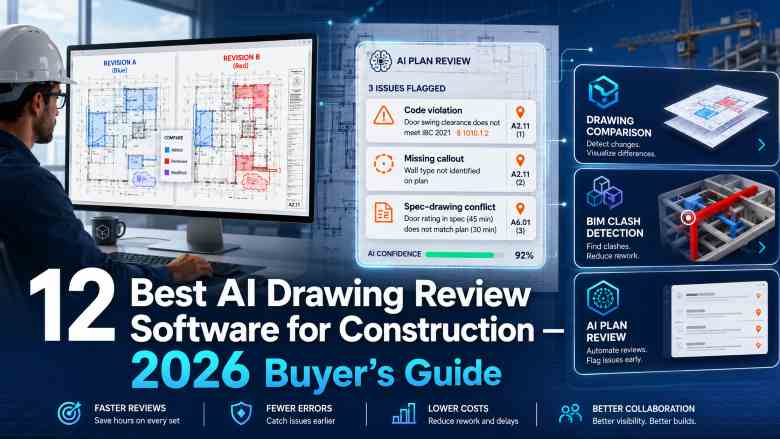
Construction drawings drive every downstream cost, schedule, and safety decision on a project — yet a typical 50-sheet commercial set still hides dozens of coordination errors, missing details, spec-to-drawing mismatches, and revision surprises that escape manual review. The best AI drawing review software for construction in 2026 fixes that by comparing revisions, cross-referencing disciplines, and surfacing risk in minutes instead of days.
ConstructionCareerHub App is LIVE — built ONLY for construction careers. Don’t apply with a weak resume.
Get ATS-ready Resume Lab + Interview Copilot + Campus Placement Prep (resume screening, skill gaps, interview readiness) — in minutes & Other advanced features.
Explore Smarter Construction Career Tools →Quick check. Big impact. Start now.
This guide compares the 12 best construction drawing comparison software and AI review tools available in 2026 — from traditional PDF overlay platforms like Bluebeam Revu, to BIM issue trackers like Revizto, to AI-first preconstruction reviewers like Provision, Nomic, Stru AI, InspectMind, Structured, and Document Crunch. Each tool is scored on drawing comparison capability, AI analysis depth, BIM support, integrations, collaboration, ease of use, and pricing transparency, with clear notes on what is independently verified versus vendor-claimed.
🚀 Building your construction technology career? Visit ConstructionCareerHub.com to use AI-powered career tools including Resume Lab, Interview Copilot, and Campus Placement Prep — built exclusively for construction professionals working in BIM, preconstruction, VDC, and digital construction roles.
Table of Contents
Quick answer — best AI drawing review software for construction in 2026
- Best overall for PDF drawing comparison: Bluebeam Revu — the industry-standard for revision overlay, markups, and quantity takeoffs, now enhanced with Smart Overlay for automated drawing comparison.
- Best for enterprise contractors and BIM coordination: Autodesk Construction Cloud — Docs, BIM Collaborate, and AI Insights combined across the entire project lifecycle.
- Best for AI-powered preconstruction review (GCs): Provision — purpose-built AI for scope, risk, and document Q&A across drawings, specs, and contracts.
- Best for AEC firms wanting agentic drawing review: Nomic — cited PDF markups against your firm’s own QA/QC standards, grounded in your project data.
- Best for BIM issue tracking and clash coordination: Revizto — federated model coordination with issue tracking across trades.
- Best for structural drawing review: Stru AI — built by structural engineers with deep IBC, ASCE 7, ACI 318, and AISC 360 code coverage.
- Best for plan check and code compliance: InspectMind AI — evidence-backed findings with per-run pricing (Y Combinator W24).
- Best for contract and specification risk review: Document Crunch — CrunchAI trained on construction contracts (now part of Trimble).
- Best for progress verification against drawings: OpenSpace — 360° reality capture matched against plans and BIM.
Comparison table — 12 best construction drawing comparison and AI review tools (2026)
| Platform | Best For | Drawing Comparison | AI Analysis | BIM Support | Integrations | Pricing Visibility |
|---|---|---|---|---|---|---|
| Bluebeam Revu | PDF overlay & markup | Smart Overlay, batch compare | Auto-recognition, markups AI | Limited (2D) | Procore, ACC, SharePoint | Public subscription |
| Autodesk Construction Cloud | Enterprise + BIM | Sheet version compare | AI Insights, ACC Copilot | Full (Revit, Navisworks) | Autodesk ecosystem | Quote-based |
| Procore | Project management & drawings | Auto-version comparison | Copilot summaries | Viewer & clash module | 400+ apps | Quote-based |
| Revizto | Federated BIM coordination | 2D sheet compare | Automated clash grouping | Full (Revit, IFC, NWD) | Revit, Navisworks, BIM 360 | Quote-based |
| Newforma Konekt | A/E project information management | Drawing set management | AI search across project | IFC, BCF, Revit | Autodesk, MS 365 | Quote-based |
| Provision | GC preconstruction & risk | Scope gap detection | Yes (Scope Agent, Risk Review) | Not required | API + PM tools | Demo/quote |
| Nomic | AEC firm-wide AI agents | Sheet-by-sheet QA/QC | Yes (Drawing Review agent) | PDF + IFC parsing | ACC, ProjectWise, SharePoint | Enterprise quote |
| Structured AI | Multi-discipline PDF review | Revision comparison | Yes (clash + code checks) | PDF only | Emerging | Demo/quote |
| Stru AI | Structural review & codes | Cross-sheet coordination | Yes (Review Agent) | PDF only | Limited | Demo/quote |
| InspectMind AI | Plan check & code compliance | Revision recheck | Yes (IBC, ADA, NFPA) | PDF (OCR supported) | Procore, ACC (Field Reports) | Per-run + monthly |
| OpenSpace | Progress vs plans | 360° capture vs 2D/BIM | Yes (progress AI) | Revit, BIM 360 | Procore, ACC | Quote-based |
| Document Crunch | Contract & spec risk | Spec-vs-contract compare | Yes (CrunchAI) | N/A (contracts) | Procore, MS Word | Tiered subscription |
Note: Feature descriptions above reflect a mix of independently verified capabilities and vendor claims as of 2026. Always validate on your own project documents before purchase — see the “Human review limitations” section below.
What is construction drawing review software?
Construction drawing review software is a category of digital tools that help project teams compare drawing revisions, detect design discrepancies across disciplines, coordinate architectural, structural, MEP, and civil documents, and record issues for RFIs, submittals, or clash reports. The most mature platforms operate on 2D PDFs — the format that every project actually issues — while BIM-native tools work on federated 3D models.
Historically, drawing review was a manual process: a senior estimator or coordinator opening two PDFs side by side, hunting for revision clouds, and flagging changes on a printed set. For civil and structural teams still living in AutoCAD, Civil 3D, and legacy tools, the shift is even more dramatic — a full breakdown of authoring platforms sits in the top civil engineering software list. In 2026, that workflow is being replaced by three overlapping toolsets:
- Traditional overlay and revision comparison tools — like Bluebeam Revu’s Smart Overlay — that align two sheets automatically and highlight geometric or textual differences.
- BIM model coordination and clash detection platforms — like Revizto, Autodesk BIM Collaborate, and Navisworks — that operate on 3D federated models.
- AI-first drawing and document review platforms — like Provision, Nomic, Stru AI, InspectMind, and Structured — that read entire document sets, cross-reference disciplines, and flag risk, code issues, and missing information with citations back to the source page.
A well-selected stack often combines two or three of these categories. For a broader view of tools used across the project lifecycle, see the list of the best construction project management software and the guide to the best BIM software in 2026.
How we scored these platforms — our 2026 methodology
To keep this listicle useful for actual purchase decisions rather than a marketing recap, each platform was evaluated on a transparent weighted scoring rubric:
- Drawing-comparison capability — 20%: revision overlay accuracy, alignment intelligence, and cross-sheet consistency checking.
- AI analysis depth — 20%: quality of automated risk detection, code checking, and cross-document reasoning.
- BIM and document support — 15%: support for PDFs, DWG, IFC, Revit, Navisworks, and spec formats.
- Integrations — 15%: connectivity with Procore, ACC, ProjectWise, SharePoint, and API access.
- Collaboration — 10%: markup workflows, RFI/issue generation, and multi-user review.
- Ease of use — 10%: onboarding effort, UI clarity, and admin overhead.
- Pricing and value — 10%: transparency, entry-level accessibility, and total cost of ownership.
Wherever specific accuracy or productivity numbers are cited below, they are drawn from vendor materials or third-party technology surveys and clearly labeled as such. Independent benchmarks in this category remain limited — a point that reinforces the “Human review limitations” section further down.
The 12 best construction drawing comparison and AI review tools in 2026
1. Bluebeam Revu — best overall for PDF drawing comparison
Best use case: Design teams, general contractors, and subcontractors that live in 2D PDF drawings for markups, quantity takeoffs, and revision comparison.
Bluebeam Revu has been the default drawing-review tool for architects, contractors, and consultants for over a decade. In 2026, its Smart Overlay functionality automates one of the most tedious tasks in construction — aligning two revisions of the same sheet and highlighting geometric and textual differences by color. Combined with Studio Sessions for real-time markup collaboration and Batch Overlay for entire drawing sets, Revu handles the bulk of day-to-day PDF drawing comparison in the industry.
Major capabilities: Smart Overlay revision comparison; batch drawing compare; markup tools; measurement and takeoff; punch lists; document sets; Studio collaborative markup sessions; PDF form workflows.
AI features: Auto-recognition tools for markup categorization, symbol detection, and takeoff assistance; ongoing rollout of Nemetschek-group AI features.
Integrations: Procore, Autodesk Construction Cloud, SharePoint, and other Nemetschek products.
Advantages: Deep industry adoption means every consultant and subcontractor speaks Bluebeam; excellent measurement and takeoff tools; strong offline use; Smart Overlay is genuinely fast.
Limitations: Primarily 2D — teams working in coordinated BIM models will still need Navisworks, Revizto, or ACC; AI capabilities are markup-focused rather than full document reasoning.
Pricing: Transparent subscription tiers (Basics, Core, Complete) available on the Bluebeam website, with per-user annual pricing suitable for small teams up to enterprises.
Ideal customer: Any team that reviews 2D PDF drawings — from a boutique architecture firm to a national general contractor.
2. Autodesk Construction Cloud — best for enterprise contractors and BIM coordination
Best use case: Large contractors and design-build firms already standardized on the Autodesk ecosystem (Revit, Civil 3D, Navisworks).
Autodesk Construction Cloud (ACC) unifies Docs, BIM Collaborate, Build, Takeoff, and Cost across the project lifecycle. Its drawing management module auto-versions sheets and lets teams compare revisions across issue transmittals. For BIM-heavy workflows, BIM Collaborate Pro adds clash detection and model coordination directly against Revit models.
Major capabilities: Sheet auto-versioning; drawing revision compare; BIM clash detection; RFI, submittal, and issue tracking; document management with permissions; field execution; cost management.
AI features: AI Insights predicts high-risk RFIs and quality issues; ACC Copilot assists with document search and summarization across the project.
Integrations: Deep native integration with Revit, Navisworks, Civil 3D, and Autodesk Forma, plus a large partner marketplace.
Advantages: Complete lifecycle coverage; strong BIM depth; enterprise governance and security controls.
Limitations: Learning curve for teams outside the Autodesk ecosystem; enterprise pricing can be significant; drawing comparison is functional but less specialized than Bluebeam’s Smart Overlay.
Pricing: Quote-based, per module and per user.
Ideal customer: ENR Top 400 contractors, large design-build firms, and infrastructure projects where BIM is contractually required.
3. Procore — best for project management-driven drawing review
Best use case: General contractors that want drawing management embedded inside a full construction management platform for RFIs, submittals, and daily field workflows.
Procore’s Drawings module auto-versions sheets as new revisions are uploaded, hyperlinks callouts across sheets, and lets teams compare current against prior revisions. Where Procore shines is in tying drawing markups directly to RFIs, punch items, and inspections — reducing the gap between “issue spotted on drawing” and “issue tracked to closure.” Procore Copilot, rolled out across 2025–2026, adds AI summarization of RFIs, submittals, and daily logs.
Major capabilities: Auto-versioned drawing sets; callout hyperlinks; markup and comparison tools; connected RFIs, submittals, punch, and inspections; BIM viewer and clash module.
AI features: Procore Copilot for RFI/submittal/log summarization and knowledge search.
Integrations: 400+ partner apps including Bluebeam, ACC, Sage, Viewpoint, and DocuSign.
Advantages: Field-first mobile experience; one platform ties drawings to every downstream workflow; strong ecosystem.
Limitations: Drawing comparison is functional but less feature-rich than dedicated tools like Bluebeam; BIM depth is lighter than ACC or Revizto.
Pricing: Quote-based, typically volume-priced against annual construction volume.
Ideal customer: Mid-size to enterprise general contractors that want a single system of record.
💡 Career tip: Preconstruction, VDC, and BIM coordination roles are among the fastest-growing in construction. Sharpen interview readiness with Interview Copilot on ConstructionCareerHub.com — role-specific practice for BIM Coordinator, Preconstruction Manager, and Digital Construction positions.
4. Revizto — best for federated BIM coordination and issue tracking
Best use case: BIM coordinators and VDC teams running multi-discipline clash detection and issue tracking across federated Revit, Navisworks, and IFC models.
Revizto federates architectural, structural, and MEP models into a single, navigable environment where clashes can be grouped, assigned, and tracked to closure. Its 2D sheet functionality lets coordinators compare drawings against the coordinated model — closing the gap between what was drawn and what was designed. Automated clash grouping helps teams avoid the classic Navisworks problem of 40,000 raw clashes and no prioritization.
Major capabilities: Federated 3D model coordination; clash detection with intelligent grouping; issue tracker linked to models and sheets; 2D sheet compare; BCF workflow.
AI features: Clash grouping automation; ongoing rollout of AI-assisted issue triage.
Integrations: Revit, Navisworks, ArchiCAD, Tekla, BIM 360/ACC, Procore.
Advantages: Superb multi-discipline coordination; strong issue tracking; excellent visualization performance on large models.
Limitations: Requires disciplined BIM authoring; less useful on 2D-only projects; per-license cost adds up on large project teams.
Pricing: Quote-based.
Ideal customer: BIM-driven projects — data centers, hospitals, high-rise, industrial, transit — where MEP-structural clashes drive rework.
5. Newforma Konekt — best for A/E firm project information management
Best use case: Architecture and engineering firms managing correspondence, RFIs, submittals, transmittals, and drawing sets across multiple projects.
Newforma has long been the project information management standard for A/E firms. Konekt, its cloud platform, extends that legacy into modern drawing set management with BCF issue coordination, IFC model viewing, and increasingly capable AI search across project correspondence, drawings, and specs. It’s less a “drawing compare” tool and more a “know what’s happening on your project” platform — but drawing management sits at its core.
Major capabilities: Project email and transmittal capture; RFI and submittal workflow; drawing set management; IFC and BCF issue coordination; contract action tracking.
AI features: AI-powered project search across drawings, specs, and correspondence.
Integrations: Revit, Autodesk ecosystem, Microsoft 365, Outlook.
Advantages: Purpose-built for A/E workflows; excellent email-to-project capture; strong contract compliance features.
Limitations: Contractor-side workflows are lighter than Procore or ACC; drawing comparison is not its headline feature.
Pricing: Quote-based.
Ideal customer: Architecture and MEP engineering firms serving as designers of record.
6. Provision — best for AI-powered preconstruction risk review
Best use case: General contractor preconstruction teams reviewing drawings, specs, and contracts to identify scope gaps and risk before pricing.
Provision is one of the most defined AI-first entrants in the drawing and document review space. Founded in 2022 and focused specifically on GC preconstruction workflows in the $150M–$600M annual revenue band, it reads full bid packages — drawings, specs, contracts, addenda — and surfaces missing, unclear, or conflicting scope through its Scope Agent and Risk Review modules. Vendor-published figures cite 99.5% accuracy on pre-built risk checklists and 97%+ on custom checklists, drawn from more than 66,000 processed documents.
Major capabilities: Scope gap detection across drawings, specs, tables, and notes; contract risk review with severity levels; project Q&A across the full bid set; RFI and redline generation from identified risks; customizable checklists.
AI features: Purpose-built construction AI for preconstruction — not a general-purpose LLM wrapper.
Integrations: API access and integration into PM tools; deeper Procore/ACC connectors on the roadmap.
Advantages: Deep vertical focus; cited findings tied to source pages; strong contract and specification handling.
Limitations: Not designed for construction-execution phases like field workflow or clash detection; accuracy claims are vendor-published and require validation on your own documents.
Pricing: Demo and quote-based.
Ideal customer: VP of Preconstruction, Chief Estimators, and preconstruction managers at GCs pursuing complex commercial, industrial, or P3 projects.
7. Nomic — best for AEC firm-wide AI agents on drawings and specs
Best use case: Design firms and engineering practices that want AI agents grounded in their own drawings, specs, standards, and QA/QC checklists.
Nomic operates as an AEC-focused agentic platform, not a single-purpose tool. Its Drawing Review agent checks every page of a set against a firm’s QA/QC standards — either the firm’s own document or Nomic’s built-in checklist — and returns cited PDF markups. Additional agents cover code compliance (against 380+ codes and standards), submittal review, and firm-wide search across historical project knowledge. Because it inherits SharePoint, Egnyte, ACC, and ProjectWise permissions, it fits enterprise governance requirements.
Major capabilities: Drawing Review, Submittal Review, and Code Compliance agents; firm-wide semantic search; cited PDF markup outputs; developer API for embeddings and drawing parsing.
AI features: Domain-specific AEC models trained on hundreds of thousands of drawings and project files.
Integrations: Autodesk Construction Cloud, Bentley ProjectWise, SharePoint, Egnyte, direct PDF upload.
Advantages: Cited outputs improve trust and reviewability; agents are configurable to a firm’s own standards; strong permissions inheritance.
Limitations: Enterprise sales model; more suited to firms with a Chief Digital Officer or CIO sponsor than to small studios.
Pricing: Enterprise quote.
Ideal customer: Mid-to-large architecture, structural engineering, and MEP consulting firms.
8. Structured AI — best for multi-discipline coordination review from 2D PDFs
Best use case: Preconstruction and design QA teams that want to run coordination, code, and revision comparison checks directly on 2D PDFs without a BIM model.
Structured AI (getstructured.ai) focuses on automated clash detection, code compliance, revision comparison, specification analysis, ADA verification, and schedule-to-drawing consistency — all from 2D PDF drawing sets. It compares itself to Navisworks, Bluebeam, Procore, and manual review, and positions itself for firms that can’t (or won’t) rely on federated BIM models.
Major capabilities: Clash and coordination checks across trades; code compliance; ADA/accessibility verification; MEP-in-ceiling coordination; missing callout and broken reference detection; schedule-to-plan consistency checks.
AI features: Purpose-built AI for construction document coordination; RFI generation from identified conflicts.
Integrations: Emerging — PDF workflow is the current core.
Advantages: Works on the file format teams actually have (PDFs, not BIM); broad multi-discipline coverage; RFI generation is a real time-saver.
Limitations: Newer entrant with smaller reference base than Bluebeam or ACC; verify accuracy on your project documents.
Pricing: Demo/quote-based.
Ideal customer: GC preconstruction teams, owner’s reps, and design QA/QC leads on projects without full BIM coordination.
9. Stru AI — best for structural drawing review and code compliance
Best use case: Structural engineering firms and QA reviewers checking structural drawings against building codes and cross-discipline coordination requirements.
Stru AI’s Review Agent was built by structural engineers and is tuned for architectural, structural, MEP, and civil coordination on 2D PDFs. Its differentiator is structural code depth — explicit coverage of IBC, ASCE 7, ACI 318, and AISC 360, along with cross-sheet coordination checks like column grid alignment between structural and architectural plans.
Major capabilities: Multi-discipline simultaneous review; cross-sheet coordination; structural code validation; annotation and dimension verification; clash detection across trades; natural-language issue reports.
AI features: Structural-engineering-tuned AI; not just OCR — it reads spatial relationships and cross-references details across sheets.
Integrations: Limited today; PDF-first workflow.
Advantages: Deep structural code expertise; strong for structural-heavy project types (industrial, high-rise, seismic zones).
Limitations: Startup-stage vendor; validate accuracy on your own drawings; integration ecosystem is still developing.
Pricing: Demo/quote-based.
Ideal customer: Structural EORs, structural review teams, and specialty structural contractors.
10. InspectMind AI — best for plan check, code compliance, and pre-permit review
Best use case: Owner’s reps, plan reviewers, permit consultants, and small-to-mid design firms doing plan check and code compliance across architectural, structural, civil, and MEP drawings.
InspectMind (Y Combinator W24) reviews construction drawings, specs, and building codes for coordination conflicts, code violations, and spec-drawing mismatches. Each issue includes the drawing snippet, code section, or specification reference — a critical feature for reviewability. Its pricing model is unusual for the category: it’s transparent, per-run, with the first $100 covered and a “5+ issues or full refund” guarantee. A separate Field Reports product handles site documentation.
Major capabilities: AI plan check with evidence-backed findings; building code compliance (IBC, ADA, NFPA, local codes); cross-discipline coordination review; spec-vs-drawing conflict detection; revision recheck; OCR for scanned drawings; separate mobile field reporting.
AI features: Trained on construction drawings and codes; customer upload data is not used for training per vendor documentation.
Integrations: Field Reports product integrates with Procore and Autodesk Construction Cloud.
Advantages: Transparent per-run pricing lowers evaluation friction; strong for permit-track projects; explicit refund policy.
Limitations: Focus is plan check rather than full preconstruction risk analysis; per-run cost adds up at scale.
Pricing: Per-run pricing on the plan review product; approximately $100 per user per month for Field Reports.
Ideal customer: Plan reviewers, owner’s reps, civil and land development firms, and small design firms.
11. OpenSpace — best for progress verification and as-built vs plans
Best use case: Field, VDC, and project management teams verifying installed work against approved drawings and BIM models.
OpenSpace is technically a reality-capture platform rather than a pure drawing review tool — but it belongs in this list because progress verification against drawings is one of the highest-value “did what was drawn actually get built” workflows in construction. Its 360° camera captures pinned automatically to floor plans, with AI-driven progress tracking that estimates what percentage of specific scopes is complete based on captured imagery.
Major capabilities: Automatic 360° site capture; plan pinning; time-lapse and side-by-side comparisons; BIM overlay; progress tracking AI; punch-list workflow.
AI features: Machine-learning progress tracking against schedules and scopes.
Integrations: Procore, Autodesk Construction Cloud, Revit, BIM 360.
Advantages: Extremely high value for owners and GCs verifying pay applications; captures durable jobsite records.
Limitations: Not a drawing-vs-drawing comparison tool; requires disciplined field capture.
Pricing: Quote-based, typically per active project.
Ideal customer: GCs, developers, and owners running commercial buildings, healthcare, and mission-critical projects where progress verification matters.
12. Document Crunch — best for contract and specification risk review
Best use case: Preconstruction, legal, and operations teams that need to review construction contracts, specifications, and RFPs for risk before bid or signature.
Document Crunch’s CrunchAI is trained specifically on construction contracts and specifications rather than general legal text. It flags indemnification, pay-if-paid, retainage, notice, liquidated damages, and lien waiver language with citations back to the source clause. In April 2026, Trimble announced its acquisition of Document Crunch to expand AI risk management across its construction portfolio — an important buyer-side signal for teams considering long-term platform bets.
Major capabilities: Contract risk review with severity levels; construction-specific playbook generation; specification vs contract compliance; project Q&A across contract documents; audit trail.
AI features: CrunchAI, purpose-built for construction contracts and specs.
Integrations: Procore, Microsoft Word; broader Trimble ecosystem integration expected post-acquisition.
Advantages: Cited outputs; strong domain focus; SOC 2 security posture.
Limitations: Contracts and specs — not drawings — are the core focus; complex multi-jurisdictional disputes still require qualified construction attorneys.
Pricing: Tiered subscription starting at approximately $200/month for small teams per public reviews; enterprise plans available.
Ideal customer: GCs, specialty contractors, sureties, and insurers reviewing construction contracts and specification risk.
Best platform by use case
General contractors: Procore or Autodesk Construction Cloud for the core platform; layer Bluebeam Revu for markups and Provision or Document Crunch for AI-driven preconstruction risk review.
Architects and design firms: Bluebeam Revu plus Newforma Konekt for project information management, and Nomic for AI-driven QA/QC against firm standards.
MEP contractors: Revizto for federated coordination against structural and architectural models; Stru AI or Structured for supplementary code checks. For interview-ready MEP fundamentals, see the 100+ MEP engineer interview questions and answers.
BIM coordinators: Revizto plus Autodesk Construction Cloud remain the strongest combination; see the BIM career guide for role expectations and the top BIM companies list for benchmarks on where the leading vendors and consultancies sit in 2026. Broader vendor mapping across the ecosystem is covered in the top construction technology companies guide.
Preconstruction teams: Provision for scope and risk on the bid set; Document Crunch for contract risk; Bluebeam for markup.
Subcontractors: Bluebeam Revu remains the most affordable and industry-standard drawing tool; add Structured AI or InspectMind for a spot-check when reviewing complex GC-issued sets.
Data-centre projects: Revizto plus ACC for BIM coordination; Provision for preconstruction scope; OpenSpace for progress verification against critical mission-ready milestones.
Industrial and EPC projects: Autodesk Construction Cloud or Bentley + Revizto for coordination; Stru AI for structural-heavy checks; Document Crunch for EPC contract risk.
Drawing comparison vs AI drawing review — what’s the difference?
These two categories often get lumped together but they solve different problems.
Drawing comparison is a targeted “what changed between Rev A and Rev B” workflow. Tools like Bluebeam Smart Overlay, Procore’s version comparison, and ACC’s sheet compare align two versions of the same sheet and highlight geometric or textual differences. This is essential during the design-change lifecycle but does not reason about whether the changes create risk or whether the drawing is even correct.
AI drawing review is a broader reasoning workflow. Tools like Provision, Nomic, Stru AI, Structured, and InspectMind read a full set — sometimes with specs and contracts — and identify code violations, missing information, cross-discipline conflicts, and scope gaps. These tools may not tell you what changed between two revisions, but they will tell you what’s wrong with the current set.
Serious teams in 2026 use both. Comparison tools sit inside the day-to-day change management loop; AI review tools sit at milestones — bid, IFC, permit, and major revision issues — where a fresh pair of digital eyes on the whole set delivers the most value. For the estimating side of this workflow, see the parallel comparison of the 12 best AI estimating software for construction.
How to select a construction drawing review platform
Selection is less about the “best” tool and more about which tool fits the actual work your team does. Run every candidate against these criteria:
- Supported file types: Does the tool handle PDF, DWG, IFC, Revit, and native spec formats you actually receive? Many AI-first tools are PDF-only.
- Revision comparison quality: Test on two real revisions of your own drawings — not a vendor demo set.
- BIM compatibility: If your projects issue federated BIM models, prioritize Revizto, ACC, or Newforma Konekt.
- RFI and issue generation: Can the tool export directly to your PM platform, or will your team re-key issues?
- Issue tracking: Does the tool close the loop from “identified” to “resolved” or is it stop at flagging?
- Procore and Autodesk integrations: If those are your systems of record, verify the connector maturity — not just a logo on the marketing page.
- Data security: SOC 2, single sign-on, data residency, and whether uploads are used for model training all matter. Enterprise procurement will ask.
- Offline use: Field teams frequently work without connectivity; Bluebeam and Procore’s mobile apps handle this well.
- Implementation effort: Enterprise tools like ACC or Newforma require change management. AI tools like InspectMind or Provision offer faster self-serve or trial workflows.
For a broader implementation framework, the 2026 construction management software guide covers rollout, adoption metrics, and cost-benefit analysis in more depth.
Human review limitations — AI does not replace professional judgment
Every platform in this list — from Bluebeam’s Smart Overlay to Provision’s Risk Review — generates outputs that must be checked by a qualified architect, structural engineer, MEP engineer, estimator, or coordinator before being acted on. Vendor-published accuracy figures of 90%, 95%, or even 99% still leave a non-trivial error rate on high-stakes construction documents. The industry has enough case history — the construction claims management guide covers many examples — to know that a single missed discrepancy on a critical detail can cost more than the annual license of every tool on this page combined.
Treat AI drawing review as a tireless first-pass reviewer that catches issues a fatigued human would miss, and treat human review as the definitive checkpoint that catches the issues the AI would confidently misread. The failure mode is not “AI got the answer wrong.” The failure mode is “AI gave a confident wrong answer that nobody double-checked.” Build a formal review step into every AI-assisted workflow.
Career relevance — what this means for construction professionals
The rise of AI drawing review is reshaping day-to-day work for BIM coordinators, VDC managers, quantity surveyors, planning engineers, preconstruction managers, estimators, contracts managers, and design QA/QC leads. Roles that primarily involved manual document review are shifting toward “AI supervisor” work — writing checklists, validating outputs, resolving edge cases, and owning the final go/no-go call. The 2026 analysis of AI’s impact on estimators, QS, and planners covers which parts of these roles genuinely survive and which are being reshaped.
For professionals building careers in this space, the most in-demand combined skill set in 2026 is: (1) fluency in one BIM authoring tool like Revit, (2) working knowledge of at least one coordination platform like Revizto or ACC, (3) markup and comparison workflows in Bluebeam, and (4) hands-on exposure to at least one AI-first platform like Provision, Nomic, or InspectMind. The best construction software to learn for a better career in 2026 maps these into role-specific paths, while the top BIM certifications guide covers the credentials most valued by employers. For anyone targeting authoring roles, the Revit modeler job description and salary guide and the broader 150+ construction job titles guide are useful reference points.
If contract administration and preconstruction are your growth track, the best construction procurement software and the construction document management guide are natural next reads. Continuous upskilling is easier with structured programs: consider the Construction Engineering and Management Specialization on Coursera, and Udemy programs like the Autodesk Revit — Basics to Intermediate course and the Autodesk Navisworks BIM coordination course for hands-on skills that pair naturally with the platforms above.
📚 Level up faster: Explore construction career ebooks at The Civil Engineer’s Career Handbook, the Construction Interview Guide, the value-packed Career Growth Bundle, and the Remote Construction Jobs Playbook — practical resources for BIM, VDC, preconstruction, and digital construction careers.
Future trends — where AI drawing review is heading through 2028
- Agentic workflows across drawings, specs, and contracts. Platforms are moving from single-purpose review to multi-agent orchestration — one agent reviews drawings, another reviews specs, another reviews contracts, and they cross-reference each other automatically.
- Deeper BIM and 2D convergence. Tools that today work only on PDFs will increasingly parse IFC and Revit files, closing the gap with Revizto and ACC.
- Consolidation. Trimble’s acquisition of Document Crunch signals more platform-level consolidation. Expect ACC, Procore, Nemetschek, and Trimble to acquire or partner with more of the AI-first entrants.
- Code compliance depth. Coverage of jurisdiction-specific codes and amendments will expand — a critical unlock for permit-track workflows in the US and Middle East.
- Continuous review, not milestone review. Instead of running a review at bid, IFC, and permit milestones, teams will increasingly have AI monitoring drawings continuously as they revise, with issues surfaced within minutes of upload.
The 2026 roundup of the best AI tools for construction project teams and the guide to how data is transforming construction both track adjacent trends worth watching. For teams whose downstream workflow leans heavily on quantity extraction and cost planning, the construction takeoff and estimating software guide and the top construction estimating software list pair well with the review-side tools above. Field-side implications are covered in the day in the life of a site engineer, and analytics maturity is explored in the construction analytics guide.
Final recommendation
There is no single “best” tool in this category — the right stack depends on whether you sit on the design side, the GC side, or the specialty contractor side, and whether your projects lean 2D-PDF or BIM. A safe, high-value 2026 stack for most contractors and design-build firms looks like this:
- Bluebeam Revu for day-to-day markup, revision comparison, and Studio collaboration.
- Autodesk Construction Cloud or Procore as the system of record for drawings, RFIs, submittals, and downstream workflows.
- Revizto for federated BIM coordination on any project with a 3D deliverable.
- One AI-first platform — Provision for preconstruction risk, Nomic for firm-wide QA/QC, Stru AI for structural depth, InspectMind for plan check, or Document Crunch for contract risk — layered onto the base stack for milestone-driven review.
Always run a pilot on your own project documents before committing to a multi-year enterprise license. The AI review category is moving fast enough in 2026 that a 12-month refresh cycle is a healthier posture than a long-term platform lock-in.
Frequently asked questions
What is the best software for comparing construction drawings?
For pure PDF revision comparison, Bluebeam Revu with Smart Overlay is the most widely used industry-standard. For teams that want comparison built into a full project management platform, Procore and Autodesk Construction Cloud both offer auto-versioning and revision compare. For AI-driven analysis of what changed and whether it matters, Provision, Structured AI, and InspectMind are strong 2026 options.
Can AI identify differences between drawing revisions?
Yes. Traditional overlay tools like Bluebeam’s Smart Overlay identify geometric and textual differences between two versions of the same sheet. AI-first platforms like Provision, Structured, and Nomic go further by evaluating whether those changes introduce risk, break coordination, or violate code — a level of reasoning that overlay tools do not perform.
Can Bluebeam compare two construction drawings?
Yes. Bluebeam Revu’s Smart Overlay feature automatically aligns two revisions of the same sheet and highlights differences by color, with additional Batch Overlay support for comparing entire drawing sets at once.
What is the difference between drawing review and BIM clash detection?
Drawing review typically operates on 2D PDF drawings and looks for missing information, coordination errors across sheets, code issues, and revision changes. BIM clash detection operates on federated 3D models and identifies geometric intersections between building elements — for example, a duct running through a beam. Serious projects use both: BIM clash detection during design, drawing review as the final safety net on the issued documents.
Can AI automatically generate RFIs from drawings?
Yes. Platforms like Provision, Structured AI, and Stru AI can auto-generate RFIs or redlines from identified issues, complete with the source drawing snippet and a suggested question. RFIs should still be reviewed and refined by the responsible engineer or coordinator before being formally issued to the design team. For guidance on RFI workflow best practices, see the construction RFI guide.
How much does construction drawing review software cost?
Pricing spans a wide range in 2026. Bluebeam Revu is publicly priced per user per year across three tiers. Procore, ACC, Newforma, Revizto, OpenSpace, Provision, Nomic, Structured, and Stru AI are all typically quote-based, scaling by users, projects, or annual construction volume. InspectMind uses a transparent per-run model with the first $100 covered. Document Crunch begins at approximately $200/month for small teams per public reviews, with enterprise pricing on request.
Is AI drawing review suitable for MEP projects?
Yes — MEP is one of the highest-value use cases because MEP-structural clashes drive a disproportionate share of RFIs and field rework. Revizto and ACC are the strongest for federated MEP coordination in 3D. Structured AI, Stru AI, and Provision are strong for 2D PDF MEP review, including in-ceiling coordination and cross-discipline conflict detection. For MEP career context and how AI is reshaping the role, see the complete MEP engineer career guide.
Do these tools work without a BIM model?
Most of the AI-first tools in this list — Bluebeam, Provision, Structured, Stru AI, InspectMind, and Document Crunch — work directly on 2D PDFs without requiring a coordinated BIM model. This is a key advantage over Navisworks-style clash detection for the many mid-market projects that don’t have a fully coordinated model. Revizto, ACC, and Newforma Konekt offer stronger workflows when a federated BIM model is available.
🎯 Ready to move faster in your construction career? Get ATS-optimized resumes, role-specific interview prep, and campus placement tools built for construction professionals — from BIM Coordinator to VDC Manager to Preconstruction Lead. Visit ConstructionCareerHub.com to explore Resume Lab, Interview Copilot, and Career Planner today.
