

Last Updated on December 8, 2025 by Admin
Cost overruns remain a persistent threat for the construction industry. A 2025 survey of U.S. projects found that nearly 70% of contractors reported budget overruns due to fluctuating material prices, labor availability and change orders. In 2026, digital technologies and artificial intelligence (AI) services are transforming the way builders control costs.
ConstructionCareerHub App is LIVE — built ONLY for construction careers. Don’t apply with a weak resume.
Get ATS-ready Resume Lab + Interview Copilot + Campus Placement Prep (resume screening, skill gaps, interview readiness) — in minutes & Other advanced features.
Explore Smarter Construction Career Tools →Quick check. Big impact. Start now.
Modern cost optimization platforms integrate estimating, budgeting, change-order management and cash-flow forecasting, and they sync real-time field data with accounting systems so project managers can spot overruns early. This buyer’s guide evaluates ten leading construction cost optimization tools. It is designed for quantity surveyors (QS), project managers, contractors and owners who need trustworthy software comparisons and real-world perspectives on how these tools can help them reduce cost overruns, improve budget control and increase profitability.
Table of Contents
What Is Construction Cost Optimization Software?
Construction cost optimization software refers to cloud- or ERP-based platforms that help builders plan, track and control project finances. Unlike basic spreadsheets, these tools integrate estimating, budgeting, job costing, and accounting in one system. A robust cost optimization platform solves problems such as:
Disparate data sources: Without integration, costs drift between estimating, budgeting and accounting. Tools like Procore and Buildern convert estimates into live budgets that update automatically when bills or timesheets are entered.
Manual updates and errors: Many small builders still rely on spreadsheets. Platforms like JobTread and Contractor Foreman streamline data entry and automate cost tracking.
Lack of forecasting: Earned-value and cost-to-complete forecasts help predict overruns. InEight and Procore offer time-phased cost forecasts and real-time budgeting.
Cost optimization differs from construction estimation software, which focuses on generating initial cost proposals, and from budgeting software, which tracks planned spending. Cost optimization platforms combine these functions with real-time updates, change-order management and analytics, delivering a comprehensive view of project finances.
Key Features to Look for in 2026
When evaluating construction cost optimization software, prioritize these essential capabilities:
- Real-time budget tracking: Synchronize field data with office systems for instant visibility into spending versus budget
- Integration with accounting systems: Connect seamlessly with QuickBooks, Sage, or enterprise ERP platforms to eliminate duplicate data entry
- Change order management: Track, approve, and document changes with full audit trails
- Forecasting and analytics: Use earned-value management and predictive tools to identify potential overruns early
- Mobile accessibility: Enable field teams to log costs, track time, and update budgets from job sites
- Scalability: Choose platforms that grow with your business, from small crews to multi-project enterprises
Top 10 Construction Cost Optimization Software (2026)
The following tools were selected based on the features above, user feedback, pricing transparency and suitability for different company sizes. Each summary provides an unbiased view of strengths and limitations.
1. InEight NOW – Best for Enterprise Cost Controls and Risk Forecasting
Best for: Large infrastructure contractors needing advanced scheduling, risk analysis and earned-value forecasting.
Key Features
- Published seat pricing and modular subscriptions: Schedule NOW ($150 per user/month), Estimate NOW ($199 per user/month) and Document NOW ($52 per user/month)
- Critical-path scheduling, Monte Carlo risk analysis and earned-value forecasting
- Unified data model allows a cost overrun flagged in the Estimate module to trigger a risk alert in Schedule
Cost Optimization Strengths
InEight’s integrated modules give project teams granular control over budgets and schedules. Earned-value tracking and Monte Carlo simulations provide early warning of potential overruns.
Integrations
Integrates with Primavera schedule files (XER), Microsoft Project (MPP) and enterprise resource planning (ERP) systems.
Pricing Model
Subscription per user per module, with optional professional services for custom integrations.
Pros
- Deep forecasting tools; unified schedule/cost model
- Published pricing reduces quote guesswork
- Suitable for mega-projects requiring audit trails
Cons
- Requires skilled schedulers; training beyond initial session is billable
- Additional modules can push costs into quote-only territory
Ideal company size: Large engineering, procurement and construction (EPC) firms and owners managing projects over $100 million.
2. Autodesk Construction Cloud (Build) – Best for Design-Driven Cost Control
Best for: Contractors integrating Building Information Modeling (BIM) with cost management.
Key Features
- Combines BIM 360 and PlanGrid; synchronizes Revit models, RFIs and cost data in real time
- Per-user subscription (~$1,680/year) or unlimited-user license negotiated as a flat fee
Cost Optimization Strengths
Real-time model-to-field sync reduces rework; cost overruns flagged in models trigger immediate adjustments. Rework costs drop when crews mark up drawings and share them instantly.
Integrations
Integrates with Autodesk Takeoff, Docs and third-party accounting platforms; exports cost data to Sage or CMiC when deeper ERP functionality is needed.
Pricing Model
Per-user or unlimited-user subscription; bundling discounts with other Autodesk products.
Pros
- Seamless BIM integration and clash detection
- Scales from single-seat to enterprise
Cons
- Cost module lacks depth of a full ERP
- Sheet-based tiers can increase renewal costs as projects grow
Ideal company size: Medium-to-large general contractors and design-build firms using Autodesk design tools.
3. Oracle Aconex – Best for Document Control and Audit-Ready Workflows
Best for: Multi-party projects with strict documentation and compliance requirements.
Key Features
- Time-stamped, permissioned workflows for drawings, emails and field changes
- Neutral hosting keeps data silos separate for joint ventures
- Pricing: ~$49/user/month at low volumes, decreasing at scale; high implementation fees ($5k–$200k)
Cost Optimization Strengths
Granular control of RFIs and transmittals reduces claims and litigation costs; the audit trail ensures that cost decisions are traceable.
Integrations
Connects with project control tools and ERP systems; often paired with lighter mobile apps due to heavy interface.
Pricing Model
Custom quotes with implementation fees.
Pros
- Strong compliance and documentation workflow
- Ideal for large infrastructure or public-private projects
Cons
- Interface suits document controllers more than field staff
- High implementation cost and mandatory training
Ideal company size: Owners and joint-venture partners on large infrastructure projects exceeding $100 million.
4. Procore – Best Mid-Market Suite for Unified Cost Control
Best for: General contractors needing a single source of truth for projects across multiple stakeholders.
Key Features
- Enterprise-grade platform with modules for budgeting, RFIs, submittals and field tools; unlimited users
- Real-time budgeting: budgets update whenever labor and production timesheets are submitted
- Time-phased cost forecasts and integration with accounting systems
Cost Optimization Strengths
By connecting field and office data, Procore gives project managers real-time insight into budget deviations and cash-flow forecasts.
Integrations
Integrates with QuickBooks, ERP systems and numerous third-party applications; large integration marketplace.
Pricing Model
Annual license based on construction volume (e.g., $4k–$6k/year for firms with < $10M in active work; higher for larger backlogs).
Pros
- Comprehensive feature set; unlimited users
- Real-time budget updates and cost forecasts
Cons
- Expensive for small contractors and requires onboarding; volume pricing increases with backlog
Ideal company size: Mid-size general contractors and specialty subcontractors with multiple concurrent projects.
5. Buildertrend – Best All-in-One Platform for Residential Builders
Best for: Homebuilders, remodelers and specialty contractors who need estimating, scheduling and client communication in one tool.
Key Features
- Cloud platform that combines estimating, scheduling, client communication and job costing
- Templates and automated proposals reduce errors and centralize document storage
- Plans: Standard ($299/month) and Pro ($499/month); unlimited users and projects
Cost Optimization Strengths
Buildertrend tracks budget versus actual and syncs invoices to QuickBooks. Accurate job costing and real-time expense tracking help small builders prevent overruns.
Integrations
Integrates with QuickBooks and Xero; limited integrations beyond those.
Pricing Model
Subscription with unlimited users; optional premium tier for large builders.
Pros
- User-friendly templates and automated proposals
- Good customer support
- Affordable compared with enterprise suites
Cons
- Integrations beyond QuickBooks/Xero are limited
- Setup can be time-consuming and there is no free trial
Ideal company size: Small-to-mid-size residential builders and remodelers.
6. Contractor Foreman – Best Budget-Friendly Suite for Small Contractors
Best for: Contractors seeking a full-featured platform at a low price.
Key Features
- All plans include features such as Gantt scheduling, RFIs, estimating, timecards with GPS and QuickBooks sync
- Pricing ranges from $49/month for a single user to $249/month for unlimited users
- Free 30-day trial and lifetime rate lock
Cost Optimization Strengths
Contractor Foreman offers Procore-like modules at a fraction of the cost, enabling small teams to manage budgets, timecards and subcontracts without large overhead.
Integrations
QuickBooks integration; exports data for deeper analysis; optional paid onboarding.
Pricing Model
Tiered plans by number of users; unlimited-user plan under $250/month.
Pros
- Affordable entry point with full feature access
- Weekly feature releases and support
Cons
- Interface can feel crowded; analytics basic
- Paid training may be required for non-technical users
Ideal company size: Small contractors and subcontractors who prioritize cost control over polished interfaces.
7. Vista by Viewpoint (Trimble) – Best ERP Suite for Medium-to-Large Contractors
Best for: Contractors needing advanced accounting, job costing and resource planning.
Key Features
- Full construction ERP that integrates job costing, service management, equipment tracking and automated payroll
- Job costing dashboards provide drill-down inquiries for change orders, materials, labor and equipment
Cost Optimization Strengths
Vista lets project managers view cost details in real time and monitor equipment usage and maintenance costs. The platform’s WIP reports support early detection of budget overruns and cash-flow issues.
Integrations
Integrates with Trimble’s field tools and extends to service management and payroll.
Pricing Model
Custom quotes based on company size; no free trial.
Pros
- Comprehensive ERP; scalable for larger firms
- Equipment tracking and service management reduce hidden costs
Cons
- Difficult to correct data entry mistakes; implementation can be complex
- Unclear pricing and high training requirements
Ideal company size: Medium-to-large contractors needing an integrated ERP and job costing solution.
8. PENTA ERP – Best Job Costing and Labor Analytics for Specialty Contractors
Best for: Specialty contractors and service contractors seeking integrated job-cost accounting and payroll.
Key Features
- Mobile timesheet and expense management (eTime and eExpense)
- Role-based workbenches that provide visual job cost summaries and labor analytics
- Forecast Entry window for cash position and margin analysis
Cost Optimization Strengths
PENTA’s mobile solutions collect job-cost data from the field and synchronize it with the office, enabling accurate labor and expense control. Detailed analytics help contractors analyze productivity and profitability.
Integrations
Integrates with accounting systems and supports customizable reporting.
Pricing Model
Custom quotes; no free trial.
Pros
- End-to-end job costing and payroll integration
- Strong customer support
Cons
- Not user-friendly for non-technical staff; mobile interface needs improvement
- Pricing lacks transparency
Ideal company size: Specialty contractors, service contractors and mid-sized firms.
9. CrewCost – Best for Automated Budgeting and WIP Reporting
Best for: Mid-to-large contractors requiring automated job costing and integrated accounting.
Key Features
- Automatic job budgeting with WIP reporting and drill-down inquiries
- Integrated accounting to eliminate double entries
- Change order management and committed cost tracking
Cost Optimization Strengths
CrewCost automates job costing tasks, produces detailed WIP reports and tracks committed costs for subcontracts and purchase orders. This helps contractors compare actual versus budget in real time and adjust resources accordingly.
Integrations
Integrates its accounting platform with job costing; fewer mobile tracking features than some competitors.
Pricing Model
Tiered pricing: ‘Grow’ plan starts at $999/month and ‘Scale’ at $2,699/month; pricing based on annual revenue.
Pros
- Automated budgeting reduces manual effort
- Early access to new features and designed to work out of the box
Cons
- High pricing tiers; best for companies with revenues over $50M
- All-in-one model may restrict flexibility
Ideal company size: Mid-to-large contractors with substantial annual revenue who need automated job costing and accounting integration.
10. Fieldwire – Best Field-Focused Add-On for Task and Punch-List Tracking
Best for: Crews that need simple mobile task management with some budget integration.
Key Features
- Mobile app for plans, tasks and punch lists; offline access to blueprints
- Pricing: Free for up to five users; Pro ($39/user/month), Business ($64/user/month) and Business Plus ($104/user/month)
Cost Optimization Strengths
Fieldwire is not a full cost management tool but complements other software by accelerating field reporting. Quick plan access and mobile pin-drop photos reduce rework and keep crews on schedule, indirectly protecting budgets.
Integrations
Integrates with Hilti tool-tracking and syncs with heavier office software for cost management.
Pricing Model
Per-user subscription; free tier available.
Pros
- Fast, offline access to drawings and tasks
- Affordable entry point for field teams
Cons
- Does not price change orders or run budgets; used as a front-end for ERP/financial systems
- Costs rise as user numbers increase
Ideal company size: Small crews needing quick field coordination; works best when paired with a full cost management platform.
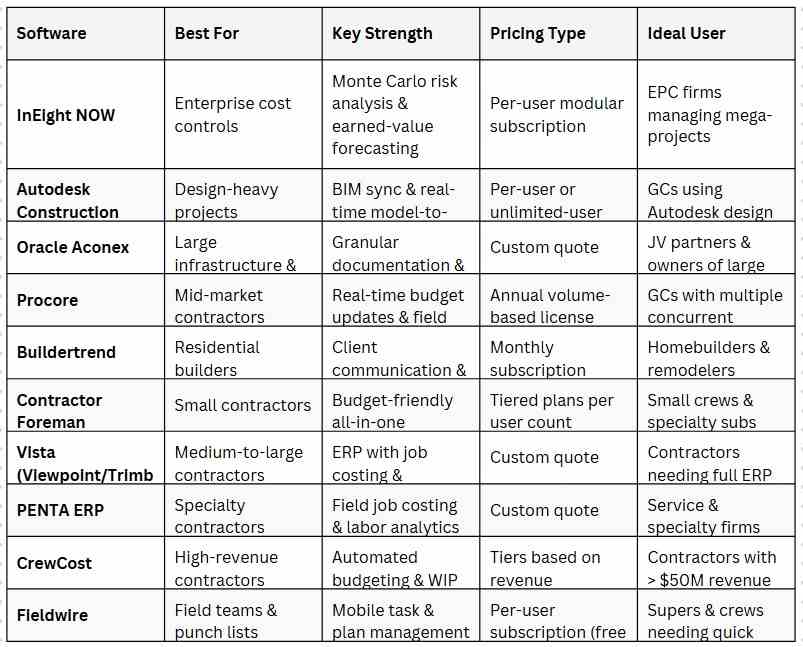
Comparison Table
How to Choose the Right Tool for Your Business
Selecting the right cost optimization platform depends on your organization’s size, project types and roles.
By Company Size
Large EPC firms should prioritize enterprise suites like InEight, Autodesk Build or Oracle Aconex. These tools offer advanced forecasting, BIM integration and audit trails, but require sophisticated teams and larger budgets.
Medium-to-large contractors benefit from unified systems like Procore or Vista, which provide job costing, scheduling and accounting in a single environment. Ensure the vendor’s pricing model scales with your workload and negotiate onboarding costs upfront.
Small contractors and specialty firms should consider Buildertrend or Contractor Foreman. They provide core features and QuickBooks integration at lower prices. Avoid paying for modules you won’t use.
By Project Type
Infrastructure and heavy civil projects require audit-ready documentation and risk analysis. InEight or Oracle Aconex can handle regulatory compliance and large consortia.
Residential and light commercial jobs benefit from streamlined scheduling and client communication. Buildertrend or Contractor Foreman are designed for these workflows.
Trade-specific projects (MEP, specialty contracting) may need Trimble or PENTA ERP, which provide trade-oriented cost coding and labor analytics.
By Role
Quantity surveyors (QS) need detailed costing, change-order management and WIP reports. Vista, PENTA or CrewCost offer robust dashboards and analytics.
Project managers benefit from real-time field updates and collaboration; Procore and Buildertrend integrate schedules, communication and budgeting.
CFOs and finance teams require deep ERP integration; InEight, Vista and CrewCost integrate with accounting systems for accurate financial reporting.
Common Mistakes to Avoid
- Ignoring total cost of ownership: Subscription and user fees rarely include training, onboarding or AI add-ons. Always budget for implementation costs.
- Overbuying features: Don’t pay enterprise prices if you only need estimating and job costing. Tools like Contractor Foreman deliver core modules at lower prices.
- Neglecting integration: Ensure the platform synchronizes with your ERP and accounting systems; otherwise you risk duplicate entry and data drift.
- Underestimating training: Many negative user reviews stem from poor onboarding or complex interfaces; invest in training to realize the full value.
Future Trends: Construction Cost Optimization (2026–2030)
AI Agents and Predictive Budgets
Platforms are embedding machine-learning agents to predict cost overruns, automate change orders and suggest optimal procurement. Microsoft and Google have raised subscription prices when bundling AI assistants, suggesting construction software vendors may follow.
Digital Twins & BIM 5D
Integrating digital twins with 5D BIM (cost dimension) will allow near real-time budget adjustments based on sensor data and progress tracking, reducing contingencies.
Carbon and Sustainability Cost Modeling
As governments tighten carbon reporting, software will include modules for embodied carbon cost modeling, linking sustainability goals with financial performance.
Automation in Quantity Surveying
AI-driven takeoff tools and natural-language change-order systems will reduce manual QS work, freeing professionals to focus on value engineering.
Usage-Based Pricing
Vendors are shifting to usage-based pricing—charging per gigabyte of drone imagery or per API call—which may benefit small firms but could increase costs for large enterprises.
Conclusion
The construction industry’s move toward digital cost optimization is accelerating. The best software for your business depends on project size, workflow complexity and budget. Enterprise suites like InEight and Oracle Aconex provide deep forecasting and audit trails but command higher prices. Mid-market solutions such as Procore and Buildertrend offer balanced feature sets and real-time field integrations, while budget-friendly options like Contractor Foreman help small crews stay competitive.
Choose a platform that aligns with your company’s scale and invest in training and integrations to maximize return on investment. By embracing modern cost optimization software, construction professionals can deliver projects on time and on budget—turning cost control from a reactive process into a strategic advantage.
Ready to Advance Your Construction Career?
Explore thousands of construction jobs and career resources at our wesbite. Whether you’re a quantity surveyor, project manager, or construction technology specialist, find your next opportunity today.
Related Posts:
Frequently Asked Questions
There is no one-size-fits-all solution. Large EPC firms may prefer InEight for its risk forecasting and integrated modules, while mid-size contractors often choose Procore for its real-time budgets and unlimited users. Residential builders and small crews benefit from affordable platforms like Buildertrend and Contractor Foreman.
AI tools improve accuracy by analyzing historical data and market trends. However, they should complement—not replace—experienced estimators. Platforms like InEight use Monte Carlo simulations and earned-value forecasting to flag risks, but human judgment remains essential.
Yes. Budget-friendly suites such as Contractor Foreman and Buildertrend provide job costing, scheduling and QuickBooks integration at a fraction of enterprise costs. Free trials or entry tiers allow small builders to experiment before committing.
Cost management software focuses on tracking budgets and expenses, while cost optimization software combines estimating, budgeting, real-time tracking, forecasting and change-order management to proactively improve profitability. Platforms like Procore update budgets with actual field data, enabling true optimization rather than mere tracking.
Reputable vendors employ encryption, role-based permissions and audit trails. Oracle Aconex, for example, time-stamps and permissions every file and RFI. Always verify that the vendor complies with local data-protection regulations.
